Mail Apps For Mac
macOS is the operating system that powers every Mac. It lets you do things you simply can’t with other computers. That’s because it’s designed specifically for the hardware it runs on — and vice versa. macOS comes with an entire suite of beautifully designed apps. It works hand in hand with iCloud to keep photos, documents, and other stuff up to date on all your devices. It makes your Mac work like magic with your iPhone and other Apple devices. And it’s been built from the ground up with privacy and security in mind.
Featuring all-new, dedicated apps for music, TV, and podcasts. Smart new features in the apps you use every day. And Sidecar, which lets you use iPad as a second Mac display.
Easy to Use When it’s simple to
do
everything, you can do anything.
Email clients come in all shapes and sizes, but when it comes to the options available on the Mac, we feel that Airmail is the best email client for most people. It’s easy to use, supports a. Email apps are a popular App Store category for one simple reason - almost all of us need to access email on our iPhones and iPads. While Apple has its own Mail app built into iOS devices, some.
On a Mac, everything is designed to work just the way you expect it to — from operating it with simple, intuitive gestures to asking Siri to find a file to having your apps automatically update themselves. Whatever you set out to do on a Mac, there’s much less to learn and that much more to accomplish.
The Finder lets you easily browse and organize the files on your Mac — and those stored in iCloud Drive. View files by icons, in a list, or with Gallery View, which helps you quickly locate a file by how it looks. Drag and drop files into folders in the sidebar. And use the Preview pane to see all of your files’ metadata, quickly create .zip files, and share using the handy Share menu.
Dark Mode adds a dramatic look to your desktop and apps that puts the focus on your content. Dynamic Desktop makes your Mac even more beautiful with time-shifting desktop pictures that match the time of day wherever you are. And Stacks keeps your desktop free of clutter by automatically organizing your files, images, documents, PDFs, and more into tidy groups.
Spotlight helps you quickly and effortlessly find what you want, like documents on your Mac, movie showtimes, and flight departure and arrival times. Just type a few keystrokes in the Spotlight search field and autocomplete immediately shows you relevant results.1
A simple two-finger swipe from the right edge of your trackpad brings up Notification Center — the same one you use on iPhone — where you can see all the alerts that have come in recently. It’s also where you’ll find your Today view, which you can customize with helpful widgets or handy information pinned from Siri searches.
Siri helps you get things done just by using your voice. It also helps you get more things done at the same time. So you can finish your document while asking Siri to tell your coworker that it’s on the way. Looking for the presentation you worked on last week? Just ask Siri.2 And with Apple Music, Siri can be your personal DJ and recommend music based on your tastes, and tell you more about songs, albums, and artists.3
- For this list of the best email apps, we only considered email clients, leaving out email services and email assistant apps. An email client is a piece of software you install on your computer or mobile device to access email, even if that email is hosted by another service. An example is the Mail app that comes pre-installed on iOS devices.
- Discuss email privately. Invite teammates to discuss specific email and threads. Ask questions, get answers, and keep everyone in the loop. The new Spark feels like the first product that may finally solve email communication and assignments for the MacStories team.
- Learn more about all the topics, resources, and contact options you need for mail on a Mac or iOS device.
- While Mail - the free email program that comes with the Mac operating system - is pretty good, is it the best email client for Mac? We're not so sure. Here we look at the best free mail apps for.
Continuity All your devices.
One seamless experience.
Your Mac works with your other Apple devices in ways no other computer can. If you get a call on your iPhone, you can take it on your Mac. And when friends text you — regardless of the phone they have — you can respond from your Mac, iPad, or iPhone, whichever is closest. When you copy text or an image from one device, you can paste it into another with standard copy and paste commands. And with Sidecar, you can extend your workspace by using your iPad as a second Mac display. You can even unlock your Mac with your Apple Watch. No password typing required.
Privacy and Security We believe your data belongs to you. Period.
Everything you do with your Mac is protected by strong privacy and security features. That’s because we build data security into everything we make, right from the start.
Privacy. You trust our products with your most personal information, and we believe that you should be in complete control of it. We respect your privacy by enacting strict policies that govern how all data is handled. And when you browse the web, Safari helps prevent data companies from tracking the sites you visit.
Security. We design Mac hardware and software with advanced technologies that work together to help you run apps safely, protect your data, and keep you safe on the web. The new Find My app helps you locate a missing Mac that’s lost or stolen — even if it’s offline or sleeping. And Gatekeeper makes it safer to download and install apps from the Mac App Store and the internet.
Built in Apps Apps as powerful and elegant as your Mac. Because they’re designed for it.
With every Mac, you get a collection of powerful apps. They’re the same apps you use on your iPhone or iPad, so they’ll feel instantly familiar. They all work with iCloud, so your schedule, contacts, and notes are always up to date everywhere. And because they’re native apps — not web apps in a browser — they take full advantage of the power of your Mac to deliver the fastest possible performance and more robust features.
Media. Experience music, TV, and podcasts in three all-new Mac apps. Get all the news that matters from sources you trust, all in one place.4 Track the market and customize your watchlist. Peruse the best book titles from your desktop. And find the latest apps and extensions for your Mac, right on your Mac.
Podcasts
Stocks
App Store
Creativity. Enjoy your best photos and videos, showcased in an immersive, dynamic new look. Transform home videos into unforgettable movies or quickly share clips with your favorite people. Create music like the pros with a huge collection of sounds, instruments, amps, and a lineup of virtual session drummers and percussionists perfectly suited to play along with your song.
Productivity. Create beautiful documents with stunning simplicity. Visualize your data precisely and persuasively in spreadsheets with images, text, and shapes. Make stage-worthy presentations using powerful graphics tools and dazzling cinematic effects to bring your ideas to life. And collaborate with friends and coworkers in real time — whether they’re across town or across the globe.
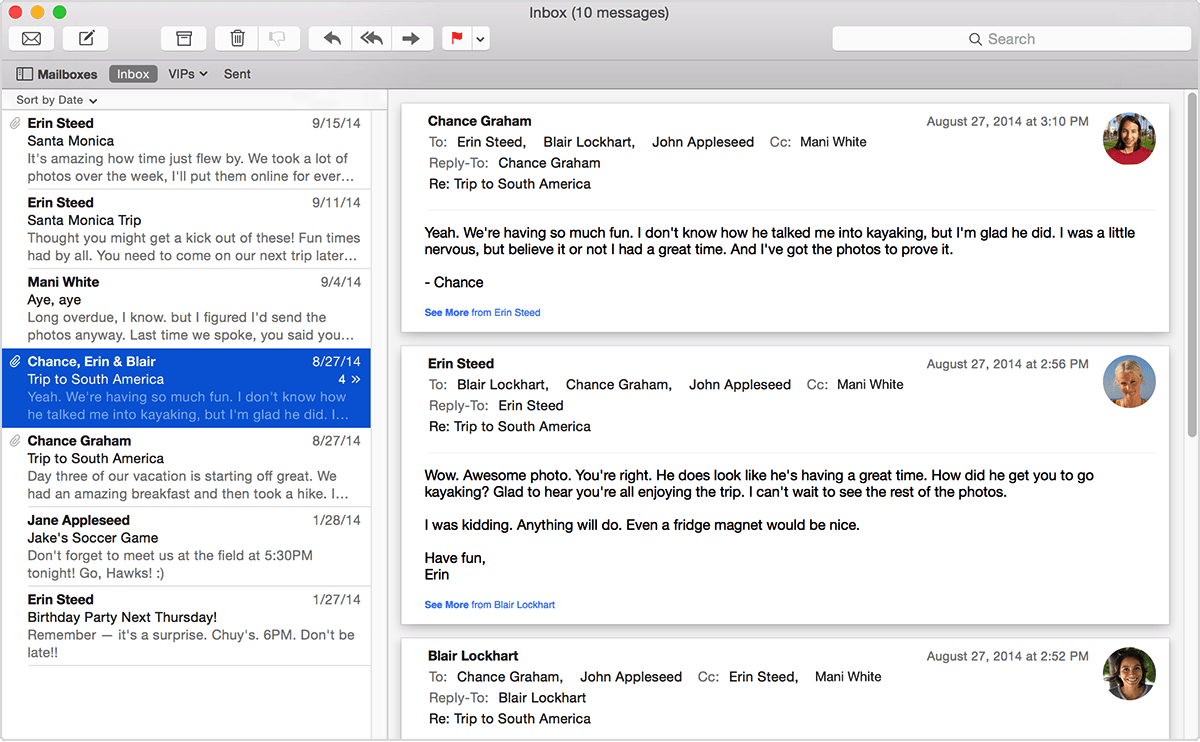
Communication. Easily manage all of your email accounts in one simple, powerful app that works with email services like iCloud, Gmail, Yahoo, AOL, and Microsoft Exchange. Send unlimited messages to anyone on any Apple device, using the same Messages app on your Mac as you do on your iPhone. Make unlimited high-quality video and audio calls right from your Mac with FaceTime. And securely locate a missing Mac using the new Find My app on Mac, iPhone, and iPad.
Mail
Messages
FaceTime
Organization. A new gallery view and more powerful search help you find your notes more quickly than ever. Easily create, organize, and add attachments to reminders. Manage your iCloud, Google, and Exchange calendars in one place, create separate calendars for home, work, and school, and view them all or just the ones you want. Instantly capture personal reminders, class lectures, even interviews or song ideas with Voice Memos. Keep all your contact info up to date on all your devices, and easily import numbers, addresses, and photos from Google and Microsoft Exchange. And control all your HomeKit-enabled accessories from the comfort of your desktop.
Notes
Reminders
Calendar
Voice Memos
Contacts
Internet. Surf the web seamlessly with an updated start page that helps you quickly access your favorite and frequently visited sites. Use Apple Pay to make purchases on the web in Safari with Touch ID on MacBook Pro and MacBook Air. Map out new destinations from your desktop, with gorgeous 3D city views like Flyover, point-to-point directions, and comprehensive transit directions. And instantly search your entire Mac or get results from the internet in just a few keystrokes.
Spotlight
iCloud All your stuff on your Mac.
And everywhere else you want it.
Every Apple app uses iCloud — it’s the magic behind the seamless experience you have with all your Apple devices. So you always have your photos, videos, documents, email, notes, contacts, calendars, and more on whatever device you’re using. And any file you store in iCloud Drive can be shared with friends, family, and colleagues just by sending them a link. iCloud Drive also lets you access files from your Mac on your iPhone or iPad. It’s all done automatically. Just like that.5
Accessibility We make sure that everyone is able to use a Mac.
macOS comes standard with a wide range of assistive technologies that help people with disabilities experience what the Mac has to offer, providing many features you won’t find in other operating systems. Voice Control lets users control their Mac, iPad, and iPhone entirely with their voice. And features such as VoiceOver, Accessibility Keyboard, FaceTime,6 and Text to Speech help everyone get more out of Mac.
Technology Advanced to the core.
macOS features powerful core technologies engineered for the most important functions of your Mac. Thanks to Mac Catalyst, you can now enjoy your favorite iPad apps on your Mac. With SwiftUI, developers have a simple way to build better apps across all Apple platforms with less code. Create ML gives developers a faster and easier way to build machine learning into apps. And support for virtual and augmented reality lets developers create immersive worlds for you to step into.
Compatibility Need to work with Windows?
Mac does that, too.
With macOS, it’s easy to transfer your files, photos, and other data from a Windows PC to your Mac. Work with popular file types such as JPEG, MP3, and PDF, as well as Microsoft Word, Excel, and PowerPoint documents. And, of course, you can run Microsoft Office natively on a Mac. If you want, you can even run Windows on your Mac.7
Got email? Of course you do. Most of us have more than one email account. There’s Gmail or Yahoo! mail. There’s email from your Internet Service Provider. There’s probably an email account from your employer. Plus, Apple’s iCloud email.
How do you manage your email? Apple’s Mail.app? Gmail.app? Or, some kind of third party email application. While Gmail might be the world’s most popular email system, Apple’s own Mail.app for iPhone, iPad, and Mac is the most used.
Differentiation, Much?
Google claims about 1.5-billion Gmail users in the world, and while that number seems huge, there is a difference between users and the apps they use. Apple’s Mail.app– according to data from Litmus Labs (and presented as a graphic on Stastista)– is the most widely used email application.
Check out the stats.
Again, there is a difference between the email system– Gmail, iCloud, Yahoo!, Outlook, Exchange, et al– vs. the applications used to access email accounts. That’s where Apple’s lead is distinct. In fact, added together, Mac, iPhone, and iPad Mail.app combine to hit 45-percent of the apps used to manage email.
Remember Mark Twain’s “lies, damned lies, and statistics?” That applies here.
I use Apple’s Mail.app on Mac, iPhone, and iPad, but only for my iCloud account. For business, Gmail, Yahoo!, my ISP, and other old email accounts that won’t die, I use Spark email because it’s easier, faster, and syncs accounts between devices so I don’t have to worry about keeping all devices up to date. Spark is free.
Another distinction to make with the statistics is obvious. They’re surveying email messages opened and the applications they use, but I know many Yahoo! and Gmail users who only use their browser interface, while Apple’s Mail.app handles not only Apple’s own iCloud email accounts, but Gmail, Yahoo! email, and whatever else you need– all within a single application interface.
What email app do you use?
How Mail.app and Gmail work is reflective of the differences between Apple and Google. Apple provides something of a similar interface between devices and an email app is table stakes for an operating system. Customers expect it. Apple needs to have an email app on each device.
Gmail is there to make money for Google.
Got spam? Me, too. Scanners for mac.
Here’s a simple method to show you just how intertwined Google, Google’s search engine, and spam are these days. Open Safari (or Chrome, or whatever browser you use), go to Google.com and enter a few search words. Make it a search word you’ve never used before. Something like hip boots, or CPD oil, or home warranty or teeth whitening or debt consolidation. Check out the search results for three or four pages. Repeat.
Over the next few weeks your email Inbox will be home to email spam about those very topics. The same holds true when you search for something on Amazon; or, even buy a product from Amazon. You get more email with more deals and bargains and promotions. Your searches on Google and Amazon are the catalyst for email from spammers.
Keyboard shortcuts for laptop computers might also differ.The settings in some versions of the Macintosh operating system and some utility applications might conflict with keyboard shortcuts and function key operations in Office. Keys on other keyboard layouts might not correspond to the keys on a U.S. To list all Word commands and keyboard shortcuts, on the Tools menu, point to Macro, and then click Macros. For information about changing the key assignment of a keyboard shortcut, see Mac Help for your version of the Macintosh operating system or see your utility application.The following list includes keyboard shortcuts for only the most common tasks. Shortcut keys for mac. On the Macros in pop-up menu, click Word commands, and then in the Macro name box, type ListCommands, click Run, and then select the options that you want.In this topic.
Google gives you free applications in exchange for the rights to collect personal information from you, and that information goes into a database dossier of sorts which is then used by advertisers to push more products aimed at your online buying habits. Facebook does something similar based upon what you read.
Other Mail Apps For Mac
Google, Facebook, Amazon, et al, have a very different business philosophy and model than Apple.
Best Mail Apps For Mac
Whose email app and system do you trust now?