External Hard Drive For Mac Reviews
5 Best External Hard Drives for MacBook Pro (as of October, 2019): 1. Samsung T5 MU-PA1T0B/AM External Hard Drives for MacBook Pro – Editor’s Choice Review. Samsung is one of the clear leaders in hard drive technology, whether external or not, and continues to dominate the market with their T5 models. That said, Samsung is notorious for their pricing which also continues to sit at the top. This WD external hard drive disk is compatible with Windows OS, so if you are using Windows 7, Windows 8, or Windows 10, you just need to connect the computer and the external HDD via a USB cable. Although, it doesn't mean that this model can't be used as Mac hard drive external device.
Hard Drive Docking Stations Reviews
If you’re looking to do some major computer repairs, a hard drive docking station might be a better choice than the standard external hard drive. The reason for this is that you can put a normal HDD in the docking station without having to use an adaptor. This prevents you from having to build the HDD into the computer. That being said, the docking station and regular hard drive are quite similar in purpose and function. The station also allows you to dock multiple internal HDDs using only one SATA or USB. There are tons of docking stations on the market, and not all are created equal in terms of price and performance. With a little research and exploration you can find the docking station that is right for you and your project. Asking the local electronics wiz at your computer store always breeds good results.
Most Popular Hard Drive Docking Stations
Plugable
The Plugable hard drive docking station is compatible with both USB 3.0 and 2.0, and both of these wires are included with your purchase. You’re getting the latest firmware with SCSI, and this ensures that the performance of the station is going to be top notch. All you do is simply connect a 3.5″ or 2.5″ SATA drive to receive fast SuperSpeed USB transfer rates. When using the USB 3.0 you’re getting speeds that are almost 10x faster than with the USB 2.0 connection. Please note that this is also backward compatible with the old USB 1.1. But it’s highly recommended that you go with the 3.0 to reach speeds from 500Mbps to 2Gbps. The incredibly simple SATA dock drive is very easy to use and quite user friendly. The lightweight designs makes it easy to carry around, should you need to. All in all, the device gets good airflow to prevent overheating, and the Plugable is compatible with Mac or PC.
- Works with all 3.5″ SATA drives
- Connection via SuperSpeed USB 3.0
- Also works with USB 2.0 or 1.1
- UASP guarantees maximum performance.
- Comes with power adapter that makes it compatible with any USB port
– Anthony Dawson
Best Overall Hard Drive Docking Stations
Thermaltake
The patented design of the Thermaltake docking station makes it one of the best performers out there. It works with 2.5″ or 3.5″ SATA HDD. The compact station stores up to 2 TB. The impressive eSATA transfer speed can get up to 3Gbps, and works pretty great with any Mac or PC. The reason why the design is so innovative here is because the compact station is built for heat dissipation and exhaust. In the box, you get your docking station, power adapter, USB 2.0 cable and eSATA cable; pretty much everything you need to get this puppy working. The sleek design is pleasing to the eye, and the user friendly construction make this station a hit. The price is quite reasonable as well, if you’re looking to stay on a budget. For the most part, the Thermaltake performs on par with the best docking stations you can find on the market.
- Work with all 2.5″ and 3.5″ SATA HDDs
- Hot Swap capability
- eSATA transfer speeds up to 3Gbps
- Compatible with USB 2.0
- Patented compact docking station
– Anthony Dawson
Best Budget Hard Drive Docking Stations
StarTech
This dual drive from StarTech provides the standard benefits of a hard drive docking station with a few extra perks. It’s compatible with all 2.5″ and 3.5″ SATA HDDs, as well as solid state drives via USB or eSATA. All of this can be done with much ease, and the user will never have to open a computer case or mount hard drives to do it. Simply connect the dual drive to your computer with the USB. Then you can insert the SATA drives for instant access. The ease of this process is what makes this a very desirable docking station, as well as its pleasant design and durability. That being said, there are some complexities that come with using an external docking station for the first time, and the handy instruction manual can be of great benefit. There’s also plenty of information online about how to perform these functions. However, once you get the hang of it, using this station is a breeze.

- Compatible with Hot Swap
- Plug and Play support
- No adapters necessary
- Supports both SATA 2.5″ and 3.5″
- 2.5″ hard drive capacity of 500GB
– Anthony Dawson
Hard Drive Docking Stations Buying Guide
Before you start shopping for a hard drive docking station, there are a few things that can help you to narrow down the range of choices before you begin. There are several different brands and models available and if you haven’t had a lot of experience with these devices, you may not yet know which unit will be the best choice for you. In order to cut down on browsing time and researching information on specifications, this guide is designed to provide you with tips that will make your experience easier and to help you more quickly find the docking station that will best meet your needs.
What is a Hard Drive Docking Station?
A hard drive docking station also known as an HDD docking station is a device that allows for the access to information that is stored on hard drives by means of USB, eSATA, and sometimes both, depending upon the model that is chosen. You will need to have a PC or Mac available to attach a data cable. The hard drive docking station allows for accessing the data on the drive without the need for installing the hard drive into an actual computer. It also provides for reading and writing to two drives at the same time. Many units are designed to provide functionality in multiple environments such as Linux, MAC and Windows.
How HDD Docking Stations Work?
There are several different types of HDD docking stations. Here is an example of how they operate.
Hard drive docking stations that connect to a Mac or PC are connected by USB and Firewire. Insert the hard drive into the appropriate docking station slot. Plug it in and turn on the power. Next, attach the data cable to the Mac or PC and wait for the device to be detected and mounted.
eSata requires starting with the PC or Mac power off. Insert the hard drive into the docking station slot, then plug it in and turn on the power. Attach the data cable to the PCX or Mac and power on the PC. Wait until the device is detected and mounted.
What Hard Drive Docking Stations are Used For?
HDD docking systems are commonly used for backing up data to an external drive for storing the information in archives. They allow for the fast transfer of data from one hard drive to another. They make testing hard drives fast and easy for technicians who need to test a variety of hard drives in a short period of time. Data recovery is made simpler by the use of an HDD docking station.
What to Look for in a Hard Drive Docking Station?
The interface is an important aspect of compatibility when purchasing a hard drive docking station. While many are designed to accommodate multiple formats, not all will. There are different formats of hard drives. The older laptop hard drives are known as IDE and are characterized by a series of small prongs protruding from the top. Newer laptop hard drives have a bar across the top with several brass fingered coverings, but they are flatter than the older IDE drives.
These drives are also known as SATA or PATA. These drives also come in a variety of widths and sizes so it is important to ensure that the docking station is designed to accommodate multiple formats. You can also refer to the actual hard drive which will list the type on the label.
Compatible system requirements
Prior to purchasing your new hard drive docking station, read the system requirements. This is an example of what you will find. You will need to have a computer, usually with a USB port that is available, and that has a compatible environment with the docking unit. Linux, Mac or Windows compatibility may be specified within the system requirements, but the best units will work for any of these. Online cloning software that is compatible with the operating system is another common requirement, and the type of compatible hard drives is also listed on the sys req. Offline cloning is available for Windows environments but not generally for use with Mac or Linux systems.
Required Accessories
When matching system requirements another important aspect of ensuring that your hard drive docking station will function properly is to check to see if the required data cables are included in the purchase. This is the cable that connects the hard drive docking station to the computer that you will be using to access the hard drive information.
Comparisons and Reviews
It is always a good idea to check hard drive docking station reviews online for the opinions of others who have used these devices. This will give you a sense of the dependability and user friendliness of different brands and models. People who have purchased, used and rated these products tell others about their experiences, both good and bad, and can help in choosing the most reliable and functional unit that will best meet your needs.
Conclusion
Choosing the best hard drive docking station is made easier by observing a few simple rules. First determine what you will be using it for, what types of hard drives you need to access and what type of computer environment you currently have. Select a reasonably priced brand and model that meets your needs. Double check to ensure that you meet the system requirements and have all of the needed connection cables so you will be ready to go.
Make sure that the unit has all of the features that you are looking for in a hard drive docking station. It must be compatible with the format of hard drives that you will be using. If you will be using a variety of different hard drives of varying sizes and system environments, then you will want to make sure that you select a unit that is compatible with multiple systems. Finally, making a quick scan of customer reviews for the brands and models that you are considering can help you in making your final decision about the docking station that will work best for you and provide long and reliable service.
When you use your computer or gaming console frequently, you may realize that the device doesn’t have enough storage for your needs. By adding extra external storage you can have access to all your content easily.
An external hard drive can give you significant storage for videos, games, photos, and documents. Many of these storage devices automatically back up your content so you don’t have to worry about losing it.
Some are even password protected so you can prevent unauthorized users from accessing your hard drive.
When you’re shopping for an external hard drive you want to first consider the compatibility.
Some are designed for use with specific operating systems and can only be used with other systems after being reformatted. There are also some external hard drives that are designed for use with gaming consoles only.
Choosing the right amount of storage is also important when deciding which external hard drive to purchase. The following is a list of the 10 best external hard drives by consumer report.
| Preview | Product |
|---|
10. WD 4TB Yellow My Passport Portable External Hard Drive
The WD 4TB Yellow My Passport Portable External Hard Drive has a stylish look and a re-imagined design. It’s compatible with the following systems: Windows 10, Windows 8 and Windows 7. It can work with Mac OS X if it’s reformatted.
This external hard drive has 4TB of space so you can easily back up all your important photos, videos, documents, and other content. This unit has password protection technology with hardware encryption so you don’t have to worry about someone having unauthorized access to your data. It has auto-backup and also includes WD backup software.
9. Seagate Game Drive for Xbox 2TB Green
The Seagate Game Drive for Xbox 2TB in Green is designed to work with both the Xbox 360 and the Xbox One. The 2 TB of storage allows you to store up to 50 Xbox One games for easy access to all your favorite content. This unit has a plug and play setup with no installation required so you can get to your games quickly.
This game drive from Seagate is small and lightweight so you can take it anywhere. It doesn’t require a power cable so you can easily take it to a friend’s house or other place for gaming. This drive is instantly detected through your console so you can easily walk through the setup steps and be gaming in minutes.
8. Toshiba Canvio Advance 1TB Portable External Hard Drive
The Toshiba Canvio Advance 1TB Portable External Hard Drive has a compact design so you can easily take it with you wherever you go. This would be ideal for students or those who travel for business and need constant access to their saved content. This hard drive comes in 4 stylish colors: black, blue, red, and white.
This external hard drive comes with a 2 year limited warranty from Toshiba. It has the option for you to download Toshiba Storage Backup Software to keep all your content safe. You can add password protection to prevent others from accessing your hard drive.
7. WD 8TB My Book Desktop External Hard Drive
The WD 8TB My Book Desktop External Hard Drive has 8TB of storage so you can keep all your necessary content on one storage device. This hard drive is equipped with auto backup and Time Machine compatibility so you never have to worry about losing your data.
This external hard drive can work with the following operating systems: Windows 10, Windows 8.1, or Windows 7. It can also be reformatted to work with some Mac systems. It’s compatible with USB 3.0 and 2.0 for easy connections to your devices. The hard drive has password protection so you never have to worry about your data being compromised.
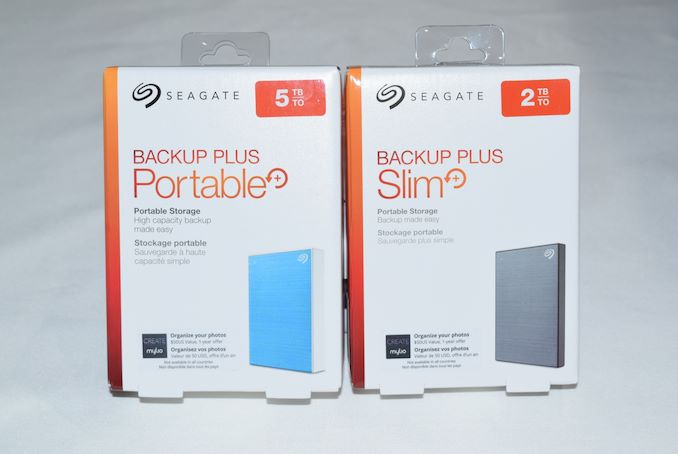
6. Seagate Backup Plus Slim 2TB Portable External Hard Drive
The Seagate Backup Plus Slim 2TB Portable External Hard Drive comes in black, blue, red, or white. This unit has a slim design that can easily fit into a backpack or other bag so you can take it with you when traveling. It also works well for students or business travelers.
This hard drive allows you to create backup plans using the included Seagate software so you data is always safe. It offers quick file transfer through USB 3.0 connectivity. This unit is compatible with the Playstation 4 and can also work with Mac and PC computers.
5. Seagate Expansion 8TB Desktop External Hard Drive
The Seagate Expansion 8TB Desktop External Hard Drive is easy to use. You simply plug in the power cable and connect the hard drive to your device through the USB port. This hard drive works with a SuperSpeed USB 3.0 port for quick transfer. It can also connect through a USB 2.0 port to provide 2.0 transfer speeds.
This hard drive from Seagate works with Windows 8 or Windows 7 operating systems. It allows you to drag and drop files to the hard drive from the Windows desktop. The unit can be used with Mac systems with reformatting if desired.
4. Seagate Expansion 2TB Portable External Hard Drive
The Seagate Expansion 2TB Portable External Hard Drive requires no complicated installation for use. You just plug the unit into your device to begin using it. This hard drive is compatible with USB 3.0 and USB 2.0 so you can use it with many different types of devices and connections.
This external hard drive can transfer files very quickly when connected with the USB 3.0 connection. It works with the following operating systems: Windows 10, Windows 8, and Windows 7. To move items to your hard drive you can simply drag and drop them from the Windows desktop. This makes the storage process quick and easy.
3. WD 4TB Black My Passport Portable External Hard Drive
The WD 4TB Black My Passport Portable External Hard Drive includes an auto backup feature that can be utilized with the included WD backup software. This hard drive also has password protection and it uses encryption so that you don’t have to worry about unauthorized people being able to access the data you have stored on your hard drive.
This hard drive comes in many different colors and color combinations. It can be used with USB 3.0 for quick file transfer. It’s also compatible with USB 2.0. It works with Windows 10, Windows 8, and Windows 7. or can be reformatted for use with Mas OS X.
2. Toshiba HDTB410XK3AA Canvio Basics 1TB Portable External Hard Drive
The Toshiba Canvio Basics 1TB Portable External Hard Drive is an affordable option if you’re looking for a large capacity hard drive on a budget. This unit has a sleek profile so you can travel with it as needed. The contemporary design and matte finish make it smudge resistant and modern looking.
This external hard drive from Toshiba is compatible with USB 3.0 and USB 2.0. It’s easy to use and requires no software installation. It gives you the option to quickly add more storage space to your PC for photos, videos, documents, and other important content. The hard drive comes with the Toshiba 1-year limited warranty.
1. WD 2TB Elements Portable External Hard Drive
Reformat wd passport for mac and pc.
The WD 2TB Elements Portable External Hard Drive offers fast data transfers for convenience. This hard drive can be connected with either USB 3.0 or USB 2.0. It has a high capacity so you can safely transfer and store all your important data.
This external hard drive can improve your PC performance by allowing you to store necessary data on the hard drive rather than having it take up space on your computer. It has a compact design that can fit into a backpack or travel bag so you can easily take it with you when you need it.
An external hard drive can provide you with a significant amount of extra storage space where you can keep videos, documents, pictures, and gaming data. These devices are relatively small and most can be taken with you wherever you may need them. Some offer extra security through encryption and password protection which can be important if you’re using your hard drive to store sensitive information. These types of hard drives are also useful if you’re using them for business as they will keep your customers’ or clients’ information safe and secure.
Portable External Hard Drive For Mac Reviews
When choosing a hard drive you should be aware of compatibility and storage space. Both of these considerations will help you choose the option that best meets your needs. Some external hard drives will require a lengthy installation process on your device while others can be plugged in and used relatively quickly with a brief setup. If you want to choose the best external hard drive for the money, you can read online consumer reviews to find useful information on the different options available.
Related Posts
Contents
External Hard Drive For Mac Reviews 2017
- 1. WD 2TB Elements Portable External Hard Drive