Tortoise Svn For Mac
- Svn For Mac
- Tortoisesvn For Mac Os
- Tortoise Svn Client Mac Os X
- Tortoisesvn For Mac Download
- Tortoisesvn For Mac Windows 10
- Svn Download
- Tortoisesvn Mac
Update: The Command Line Tools for Xcode 5 include SVN 1.7.10.
Bitdefender free antivirus for mac. Bitdefender is very straightforward, with three clear options when the program first launches. ProsNo slowdown: Bitdefender ran smoothly in the background, without having any noticeable effect on the rest of the Mac.Clear options: Some virus protection software is too complicated for the beginner to use effectively. You can scan custom locations, do a full system scan, or scan a specific location.Automatic virus definition updates: Bitdefender allows you to request that it update automatically to its virus database.
If you're a Mac user, you can walk you through the steps of downloading the SVN command line tools for OSX, setting up a repository, and using the svnadmin and svnserve tools to manage your own local server. Video: Your own server: Apache SVN on Mac. This movie is locked and only viewable to logged-in members. Embed the preview of this. I don't really understand why you'd need the same tool under both Windows and Mac. Let the Windows people in your group use Tortoise, and use something else on your Mac - svn is integrated pretty nicely in Xcode. I'm probably missing something, though, so if I'm not making sense please ignore me. SvnX is a free and open source SVN client for the Mac. It has a rather simple user interface and supports most features required for SVN work. Let’s install it to get a better idea of what it can do. Head over to the SvnX site and download the latest release. Popular Alternatives to TortoiseSVN for Mac. Explore 10 Mac apps like TortoiseSVN, all suggested and ranked by the AlternativeTo user community. TortoiseSVN is a Subversion (SVN) client, implemented as a windows shell extension. Which means it's available right where you need it: in the Windows file explorer. It's intuitive and easy to use, since it doesn't require the Subversion command line client to run. Simply the coolest Interface to (Sub)Version Control! New to Subversion? Versions makes Subversion easy. Even if you're new to version control systems altogether. Commit your work, stay up to date, and easily track changes to your files. All from Versions' pleasant, true to the Mac interface. – SVN client for MAC OS X – Versions offers the simplest Subversion on the Mac. In their own words, “Thanks to its clear-cut approach, you’ll hit the ground running”. It is easy to use. $39 GBP (around $64 USD at today’s exchange rates).
I downloaded the latest version of Eclipse and Subclipse for my new work Macbook Pro. When I ran svn commands in Terminal I received some odd messages. After some confusion, I realized Subclipse checked out the repository using SVN version 1.7. Unfortunately Mac OS X Mountain Lion runs SVN version 1.6.
I could have downgraded Subclipse. However, I had already checked out several repositories. Furthermore, I liked the smaller footprint of SVN 1.7. In typical lazy developer fashion, I went with updating SVN to version 1.7 for Mac OS X.
To give due credit, the foundations of this post came from a post on Building SVN 1.7. Although I expanded on it, I encourage you to read the original post. For completeness, I outlined the full process below.
Note: To compile and install SVN 1.7 you need Xcode with the Command Line Tools installed.
Download the SVN Source
Svn For Mac
Note: You may need to update the curl command to download the latest SVN 1.7 source.
Build and Install SVN
The default SVN install on Mac OS X uses neon. neon allows you to connect to remote SVN repositories via HTTP and HTTPS. Lines 2-7 installs neon. Line 8 builds SVN using the --with-neon configuration flag.
Using the New SVN
Your environment will still use SVN version installed with Mac OS X:
To use the SVN version you just installed, you can update your PATH. Assuming you are using the bash shell, add or edit the following line in your ~/.bash_profile:
You should now see the SVN version you installed:
Find this interesting? Let's continue the conversation on Twitter.
A comparison of Subversion clients includes various aspects of computer software implementations of the client role using the client–server model of the Subversionrevision control system.
Descriptions[edit]
Tortoisesvn For Mac Os

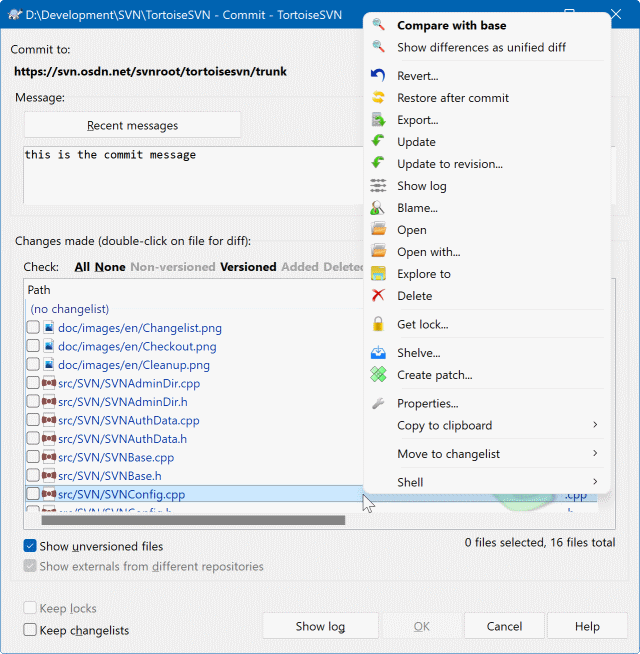
TortoiseSVN, a Windows shell extension, gives feedback on the state of versioned items by adding overlays to the icons in the Windows Explorer. Repository commands can be executed from the enhanced context menu provided by Tortoise.
Tortoise Svn Client Mac Os X
Cornerstone is a GUI for Subversion written with Xcode for MacOS X.
SmartSVN provides a similar Explorer integration, but also can be used as a standalone SVN client for different platforms. SmartSVN is available in three different editions: A free Foundation edition with fewer features and two commercial editions called Professional and Enterprise with the full feature set.
Tortoisesvn For Mac Download
Some programmers prefer to have a client integrated within their development environment. Such environments may provide visual feedback of the state of versioned items and add repository commands to the menus of the development environment. Examples of this approach include AnkhSVN, and VisualSVN for use with Microsoft Visual Studio, and Subversive[1][2]for use with Eclipse. Delphi XE Subversion integration is built into the Delphi IDE.
It is common to expose Subversion via Webdav using the Apache web server. In this case, any Webdav client can be used, but the functionality provided this way may be limited. Alternative ways to serve Subversion include uberSVN and VisualSVN Server.
Subversion clients comparison table[edit]
Tortoisesvn For Mac Windows 10
| Name | Programming language, toolkit | Operating system | License | Integration | Languages | Network protocols | Current version | Last release date | Server functionality | Visualization |
|---|---|---|---|---|---|---|---|---|---|---|
| AnkhSVN | C#, SharpSvn | Microsoft Windows | Apache License | Microsoft Visual Studio (all editions except Express) | English | http, https, svn, svn+ssh, file | 2.6.12735 | October 5, 2016; 3 years ago | No | Diff, blame, history, properties |
| Cornerstone | Xcode | macOS | Proprietary, free trials available | Standalone GUI | English | http, https, svn, svn+ssh, file | 3.1 | February 8, 2018; 20 months ago | No | Diff, blame, history, properties |
| CODESYS SVN | C#, SharpSvn | Microsoft Windows | proprietary, trials can be negotiated | SVN plugin for CODESYS V3 | English, German | http, https, svn, svn+ssh, file | V4.1.0.2 (based on SVN 1.9.4) | November 3, 2016; 2 years ago | No | Diff, merge, log |
| eSvn | C++, Qt | Unix-like operating systems (GNU/Linux distributions, FreeBSD, Sun Solaris and others), Mac OS X and Windows | GPL | GUI, standalone (like WinCVS, Cervisia) | English | http, svn | 0.6.12 | For *nix OSs: July 16, 2007; 12 years ago.[3] For Windows: July 12, 2007; 12 years ago[4] | No | ? |
| kdesvn | C++, Qt | Linux, Unix, Mac OS X | GPL | Konqueror, Dolphin, standalone | English | file, http, https, (k)svn, (k)svn+file, (k)svn+http, (k)svn+https, (k)svn+ssh | 2.0.0 | December 4, 2016; 2 years ago[5] | Yes | ? |
| PixelNovel Timeline | C++ | Mac OS X, Microsoft Windows | Free if used with PixelNovel web storage, 30-day trial with commercial upgrade otherwise | Adobe Photoshop | English | svn | 1.0 | July 7, 2009; 10 years ago[6][7] | ? | ? |
| QSvn | C++, Qt | Linux, Unix, Mac OS X, Microsoft Windows | GPL | GUI, standalone (like WinCVS) | English | 0.8.3 | July 26, 2009; 10 years ago | No | ? | |
| RabbitVCS | Python, GTK+ | Linux | GPL | Nautilus, Thunar, Gedit, CLI | ca, cs, de, en, es, fa, fr, he, hr, it, ja, nb, nl, pl, pt, ro, ru, sk, sl, sv, zh_CN | http, https, svn, svn+ssh, file | 0.17 [8] | June 23, 2017; 2 years ago[9] | ? | ? |
| RapidSVN | C++, wxWidgets | Linux, Unix, Mac OS X, Microsoft Windows, Solaris, many more | GPL | GUI, standalone | Unicode, many | 0.12.1 | June 28, 2012; 7 years ago | No | External | |
| SubTile | XUL, Javascript | Linux, Unix, Mac OS X, Microsoft Windows (Any with Xulrunner or Firefox) | GPL, Mozilla Public License, Apache License | GUI, standalone | English | http, https, svn, svn+ssh | 0.2 | May 3, 2016; 3 years ago[10] | No | Diff, merge, revision graph |
| SVN Notifier | C# | Microsoft Windows | GPL | GUI, standalone. It needs TortoiseSVN installed. | English | http, https, svn, svn+ssh, file | 1.9.3 | June 25, 2012; 7 years ago[11] | ? | ? |
| TortoiseSVN | C++, MFC | Microsoft Windows (32/64-bit) | GPL | Windows Shell (Explorer) | 54 languages (including en) | http, https, svn, svn+ssh, file, svn+XXX | 1.12.0 | April 25, 2019; 6 months ago | Yes | Diff, merge, Revision Tree, blame |
| Trac | Python | Linux, Unix, Mac OS X, Microsoft Windows | Modified BSD | web-based | [31 languages][3] | file | 1.2.4[12] | July 17, 2019; 3 months ago[13] | Yes | Log |
| Version Control for engineers | - | Windows | freeware | GUI, standalone | English | http, https, svn, file | 0.20 | November 10, 2016; 2 years ago[14] | No | Internal image diff, external diff, diff for MS Word doc, MS Visio VSD drawings, DWG and DXF drawings, Kompas CDW, commit logging |
| ViewVC | Python | http, https | 'two-clause Berkeley-style' | web-based | English | http, https, svn, svn+ssh, file | 1.1.23 | November 4, 2014; 4 years ago[15] | ? | Diff, annotation, blame, revision graph |
| VisualSVN | Microsoft Windows (32/64-bit) | proprietary | Microsoft Visual Studio (all editions except Express) | English | http, https, svn, svn+ssh, file | 6.0.4 | September 11, 2017; 2 years ago[16] | Yes | ? | |
| Xcode | Objective-C, Cocoa | Mac OS X | Proprietary, free on Mac App Store | Xcode IDE | English | 5.0.1 (4H127) | October 22, 2013; 6 years ago | ? | ? |
Standalone Subversion clients comparison table[edit]
| Client name | Free | Network protocols | Diff | Merge | Browse remote repository |
|---|---|---|---|---|---|
| Cornerstone | No | file, http, https, svn, svn+file, svn+http, svn+https, svn+ssh | Yes | Yes | Yes |
| eSvn | Yes | http, svn | ? | ? | ? |
| kdesvn | Yes | file, http, https, (k)svn, (k)svn+file, (k)svn+http, (k)svn+https, (k)svn+ssh | Yes | Yes | Yes |
| QSvn | Yes | Yes | ? | ? | |
| RapidSVN | Yes | internal | internal | Yes | |
| SubTile | Yes | http, https, svn, svn+ssh | Yes | Yes | Yes |
See also[edit]
References[edit]
Svn Download
- ^Cei, Ugo; Lucidi, Piergiorgio (2010). Alfresco 3 Web Services. Packt Publishing Ltd. p. n.p. ISBN9781849511537. Retrieved 2013-03-04.
In Eclipse, for instance, you will have to install one of the existing Subversion plugins, such as Subversive [..]
- ^http://www.eclipse.org/subversive/
- ^eSvn - Browse /eSvn/0.6.12 at SourceForge.net
- ^eSvn - Browse /eSvn/0.6.11 at SourceForge.net
- ^Released Version 2.0.0 – Kdesvn project
- ^Press Room - PixelNovel - innovative tools for Adobe Photoshop users, such as version control for Photoshop and a Photoshop plugin for exporting photos to FlickrArchived 2012-07-12 at Archive.today
- ^PixelNovel Timeline Released - Press Release -PixelNovel - innovative tools for Adobe Photoshop users, such as version control for Photoshop and a Photoshop plugin for exportin..Archived 2012-07-13 at Archive.today
- ^[1]
- ^[2]
- ^SubTile Project
- ^http://svnnotifier.tigris.org/source/browse/*checkout*/svnnotifier/trunk/ReleaseNotes.txt
- ^Trac Changelog
- ^Trac Changelog
- ^″Version Control for engineers″ page on Sourceforge
- ^viewvc Documents & files:
- ^VisualSVN Version History