Microphone For Mac
Dec 14, 2017 GarageBand for Mac: Connect a microphone. You can connect a microphone to your computer to record your voice, an instrument, or any other sound to an audio track. You can connect a microphone to your computer to record your voice, an instrument. If Built-in Input doesn’t appear in the menu, choose GarageBand Preferences, click Audio/MIDI, and choose Built-in Input from the Audio Input pop-up menu. If you’re using a microphone connected to a USB port, choose the microphone. If you’re using a microphone connected to an audio interface, choose the channel number for the microphone. For the best performance when using Voice Control with a Mac notebook computer and an external display, keep your notebook lid open or use an external microphone. All audio processing for Voice Control happens on your device, so your personal data is always kept private. Use Voice Control on your iPhone or iPod touch. Best microphones for PC and Mac: If you use a lot of video calling apps like Skype or Hangouts on your PC or Mac, you need a quality microphone. There are so many uses for a computer microphone. Whether it’s to record music, podcasts, and go live on Facebook or YouTube, you need to have a microphone that gives you the best value for your money. Whether you're recording a tutorial, gaming video, or even just making a call on Skype, using an external microphone can really boost the audio quality of your end result. This tutorial will show you how to set up an external microphone with various programs on your Mac. There are a lot of.
- Microphone For Macbook Pro 2018
- Microphone For Mac Air
- Microphone For Mac Dictation
- Best Microphone For Windows 10
BestUSB Microphone for MaciMore2019
When it comes to USB microphones for your Mac the best option when it comes to versatility and convenience is the Blue Yeti. Not only can it record in four different modes, but it's 16bit/48kHz recording sample rate always comes out sounding loud and clear.
Best Overall: Blue Yeti
The four different recording modes are where the Blue Yeti really shines because it there's practically nothing you can't record with the Blue Yeti if it's set on the right mode. I'm not the only one on the iMore team that loves the Blue Yeti, Rene Ritchie, star of Vector on YouTube has been using his for years, and he loves how easy the Blue Yeti is to use.
Turn the device off, then start again at step 1.). To unpair it, choose Apple menu System Preferences, then click Bluetooth. Wireless mouse for macbook air. Hover the pointer over the device you want to remove, then click the button that appears next to the device's name. Wait until your device's LED starts blinking, which means that it's in Discoverable Mode. (If the LED is on but not blinking, your device is already paired with another host.
'Blue Yeti is still my pick for best USB microphone — not just for the Mac but for anyone starting out doing anything, including podcasts, audiobooks, live streams, videos, and more. It plugs right into your device, no audio interface needed, sounds great out of the box, and has a few simple options if you need to adjust for particular circumstances, like two people sharing one mic. Of course, it can't beat a high-end XLR mic and interface, but at a tenth or less the price, it sounds so good you'll probably think twice, hard, before considering those higher-end purchases. It's the mic I used for years, still, travel with today, and always recommend to anyone who asks.' — Rene Ritchie, 10-year podcast veteran and host of iMore show, MacBreak Weekly, and VECTOR
Its basic cardioid mode is fantastic for capturing a single voice or instrument in front of the mic, making it perfect for game streaming, video calls, or vocals.
The omnidirectional mode allows the Blue Yeti to pick up sounds from all around it, meaning you can put it in the middle of a table and have multiple people speaking, and it won't miss a single word. This mode is great for podcasting with multiple hosts and guests, or for capturing the noise around you.
Bidirectional mode allows the Blue Yeti to be an interview microphone with minimal setup. Just put the microphone between you and the other person speaking and never touch it again.
Lastly, stereo recording mode allows the Blue Yeti to use the left and right channels to record in stereo and give your recordings a more realistic soundstage when there is more than one sound source in front of the microphone.
Pros:
- Headphone jack for live monitoring
- Manually gain adjustment
- Four record modes
- Great price
Best Overall
Blue Yeti
Most features for the best price
With four recording modes, plug-and-play functionality, and live monitoring, the Blue Yeti offers the most versatile experience for the best price.
The Rode Podcaster is a fantastic microphone for anyone that wants to record their voice. Whether you're making Skype calls, podcasting, or recording yourself streaming, the Rode Podcaster has a tight cardioid pattern that rejects sound from the rear or too far away, making sure you have a clear recording with no unwanted noise coming from all around you.
The Rode Podcaster is a very simple, but elegant USB microphone that iMore managing editor Lory Gil has been using with great success for years.
'I use the Rode Podcaster bundle. It's easy to set up, sounds great, and the boom stand mounts to my desktop so I can swivel it into range when I need it. The Rode is specially designed for voice, so it has warm tones with even bass, and the cardioid pattern isolates my voice, so there isn't too much background noise being picked up.'* — Lory Gil, Managing Editor of iMore
Pros:
- Comes with stand
- Some with shock mount
- Excellent sound isolation
Excellent Sound Isolation
Rode Podcaster
Boom arm and shock mount included
The Rode Podcaster is a solid choice for anyone who wants to ensure that background noise is no issue when recording.
Blue's newest USB microphone takes a lot of what people love about the Blue Yeti and shrinks it down (both in size and price) into a pretty compelling product. Both its cardioid and omnidirectional pickup patterns support sample rates up to 24-bit at 48Khz, and it's included stand keeps it stable while recording so you don't get any noise from the microphone moving around.
Cons:
- No manual gain control
- Only two recording patterns
Smaller Yet
Blue Yeti Nano
A compact microphone that still offers a lot.
Both the cardioid and omnidirectional pickup patterns support sample rates up to 24-bit at 48Khz, which is slightly better than its larger version.
Great for Singer/Songwriters: Audio-Technica AT2020 USB
Functioning much like a traditional XLR microphone, the Audio-Technica AT2020USB is ideal for the singer/songwriter in you who loves to record digitally. Being a cardioid microphone, the AT2020 USB performs best when recording sound from a single source located in front of the microphone. What makes the AT2020 USB so great for musicians is its ability to easily fit into shock mounts and mic booms, allowing you to position the microphone perfectly in your space.
Pros:
- Shock mount compatible
- Live monitoring with the headphone jack
- Plug-and-play
Great for Singer/Songwriters
Audio-Technica AT2020USB
Perfect for instruments and vocals
The 16bit/48kHz recording sample rate and ability to fit in most shock mounts and mic stands makes it perfect for recording all sorts of instruments and vocals.
Although the Meteor is only meant to capture a single sound source, it does record all of its audio at a 16 bit, 48kHz sample rate, which means you're getting great sounding audio every time you sit in front of it. It's lightweight and quite compact, allowing you to transport the Meteor anywhere you need to go, so you never have to worry about sounding bad when you're on the road.
Pros:
- Super compact and portable
- Plug-and-play
- Inexpensive
Cons:
- Poor sound isolation
- Only one recording pattern
Budget Option
Samson Meteor
Perfectly portable to take anywhere
It's small and easy to carry around, meaning you can always bring it anywhere with your MacBook, and its price can't be beaten.
Bottom line
Much like Rene has said, the Blue Yeti is the best all-around microphone for most Mac users. It's four recording modes offer an incredible amount of versatility, meaning regardless of what you're trying to record, you should be able to get a high-quality recording.
I have personally used my Blue Yeti to record podcasts with multiple guests, record guitar and vocals on a musical track, and every day for multiple Skype and Google Hangouts over the past couple of years, and I have never been disappointed.
Credits — The team that worked on this guide
Luke Filipowicz is an iMore staff writer who has been using microphones to record podcasts and even his band on his Mac.
Lory Gil is the Managing Editor of iMore and knows her way around a microphone, as she records multiple podcasts every week.
Rene Ritchie is the foremost authority on all things Apple and has insider knowledge about the goings-on at the biggest tech company in the world. He uses microphones with his Mac every day to record videos, interviews, podcasts, and much more!
We may earn a commission for purchases using our links. Learn more.
📱 🤓 🙌🏼These back cover cases will work with Apple's Smart Cover
Are you looking for an iPad Pro 10.5 case that works effortlessly with Apple’s Smart cover? Never fear, we have you covered with these awesome back cover cases!
So you need a computer microphone? Many laptops come with built-in mics, but they usually aren’t anything to celebrate. If you have a desktop PC, a lot of times they won’t come with a microphone.
So which one should you get?
Our top pick for a computer microphone is the Blue Yeti.
It really depends on your intended use and budget though, so we’ll highlight our favorite picks for general use, like when using Skype or Zoom. All of these are excellent desktop mics for a variety of uses.
Microphone quality usually increases with price, so know that for the most part, your budget will determine how well you will sound. You will also want to consider the type of input you are using. USB and 3.5mm are common connections that work with both Mac and PC.
Lastly, is portability import? Some of these mics are great for travel.
Check out our dedicated posts for gaming mics and USB podcasting mics if either of those fits your use case.
Contents
- Best All-Purpose Computer Microphones
Best All-Purpose Computer Microphones
All of the computer microphones listed here come with either built-in or detachable stands so you don’t have to worry about how to keep them standing on your desk.
Blue Yeti
Our top choice for the best PC microphone is the Blue Yeti. Not only is the sound quality excellent for the price, but it has features that I’ve found I cannot live without (I use it on a Mac for podcasting). Whether you plan on using it for gaming, podcasting, voiceovers, YouTube videos, Skype calls, Hangouts, or all of the above, this mic excels.
You can switch it between 4 modes so you can use it for solo speaking, conference calls, in-person interviews, music recording and more.
You can plug in a pair of headphones and adjust the volume, change how sensitive the mic is (gain control), and it comes with a nice sturdy base that allows the mic to be adjusted to the correct position on your desktop (every desk is different).
Shure MV5
Not only is the Shure MV5 a good computer microphone, but it is Apple MFi Certified. That means you can connect it directly to an iOS device without any adapters. It includes both a USB cable and a Lightning cable, so you don’t have to worry about needing to buy a separate cable.
It includes a headphone jack for monitoring, 3 preset DSP modes, and is small enough to carry with you. You can remove it from its stand and use it laying on a desk or table, making it even more portable.
Microphone For Macbook Pro 2018
This is easily one of the best computer mics under $100 – and the ability to use it on your iPad or iPhone is really a bonus!
Audio-Technica AT2020USB+
The AT2020 is a classic vocal mic that performs well above its price point.
The AT2020USB+ is, you guessed it, the plug-n-play USB version.
It has a headphone jack so you can listen to yourself speaking (don’t use your speakers or there’s a good chance you’ll get a nasty echo) and a mix control dial that lets you blend audio from your computer with whatever you microphone is hearing (like your voice).
It comes with a USB cable, tripod stand, carrying pouch, and a threaded mount for attaching to other desktop stands or arms.
Samson Go Mic
The Samson Go Mic is one of the best computer mics for travel and portability. It is plug and play for both Mac and PC (no drivers required) and will sit on a desk or clip to your laptop screen.
But don’t discount it because of that. It has a headphone jack for live monitoring, a frequency response from 20Hz to 18kHz, and comes with a carrying case. This is a great all-around mic that will perform well recording YouTube videos or chatting over Skype.
Samson Meteor Mic
The Samson Meteor Mic offers a great value for the price – and is a great complement to any PC or Mac. You get a flat frequency response from 20Hz to 20kHz, 16-bit 44.1/48kHz resolution, and a headphone monitoring jack. It comes with a USB cable and a carrying case.

You’ll get great sound for any spoken audio for under $70.
Audio-Technica ATR2100-USB
The Audio-Technica ATR2100-USB is one of my favorite entry-level PC mics. You can use it with either USB (for direct connection to your computer) or XLR (for use with a mixer or audio interface) connections, giving you a lot of flexibility and room for expansion.
It’s also a dynamic microphone, meaning that it won’t pick up background noise as easily as most of the other mics on this page.
Because you can use it handheld or with the included stand for desktop use, it works great as a vlogging mic or podcasting mic, among many other uses.
We featured it in our podcast starter kit and we have a separate review if you want to learn more or see some recommended accessories.
Microphone For Mac Air
Blue Snowball
Microphone For Mac Dictation
The Blue Snowball is a quality budget microphone for your PC. You can choose between cardioid and omnidirectional (front and all directions, respectively) pickup patterns and the metal stand is adjustable to different heights.
Blue offers 6 different colors of the Snowball so you can get the exact look that matches your setup and will great on your desktop.
If you’re looking for a plug and play mic that is made by a reputable company, sounds great, and is easy to use for under $50, grab this one.
Best Microphone For Windows 10
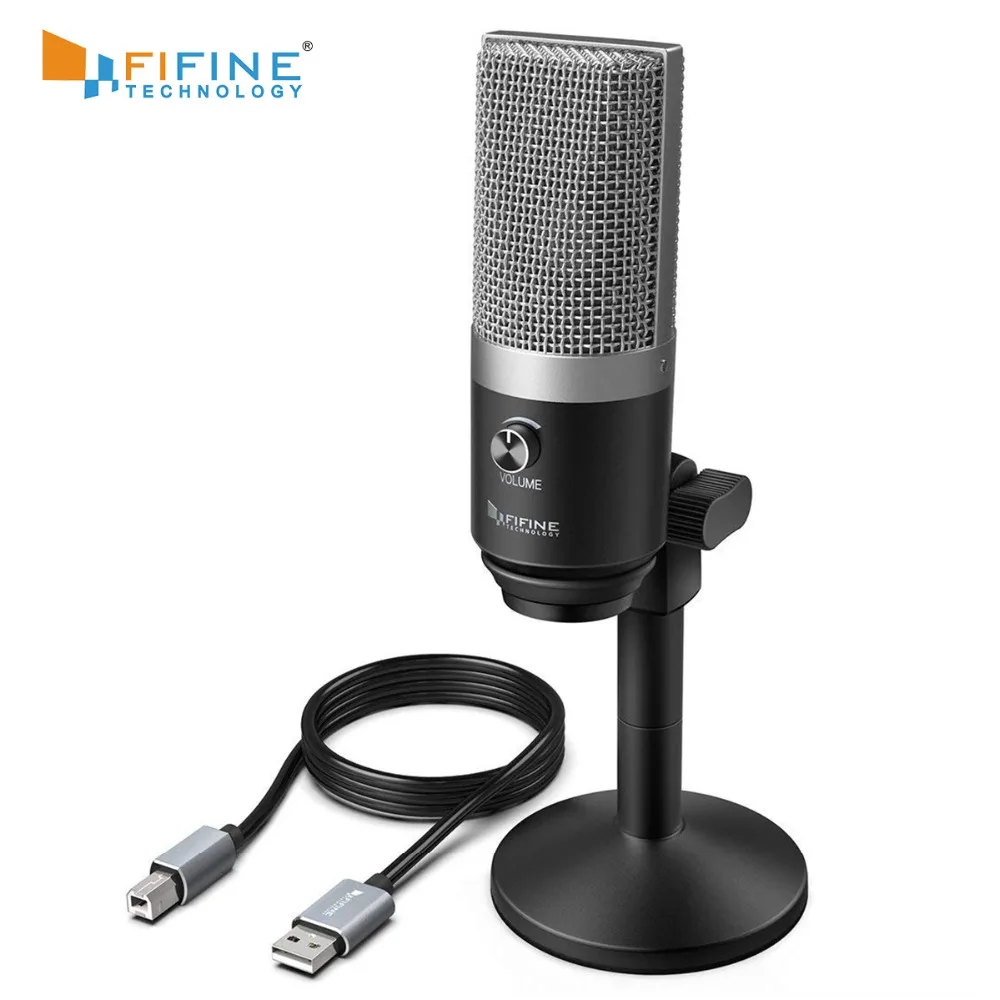
Fifine Cardioid Mic
There is a cheaper version, but it doesn’t have the onboard volume control and it picks up sound from all directions, which is bad in most cases. The cardioid version uses a cardioid pickup pattern, meaning that it is meant to just pick up sound from the front – like your voice. It’s an upgraded version of Amazon’s best-selling computer mic and is a good choice for a cheap PC microphone.