Megadownloader For Mac
Latest Version:
MegaDownloader 1.7 LATEST
Requirements:
Windows XP / Vista / Windows 7 / Windows 8 / Windows 10
Author / Product:
Andres_age / MegaDownloader
Old Versions:
Filename:
MegaDownloader_v1.7.exe
MD5 Checksum:
e3c5ea31e0e5291cfeea503cf3c4e56f
Details:
MegaDownloader 2019 full offline installer setup for PC 32bit/64bit
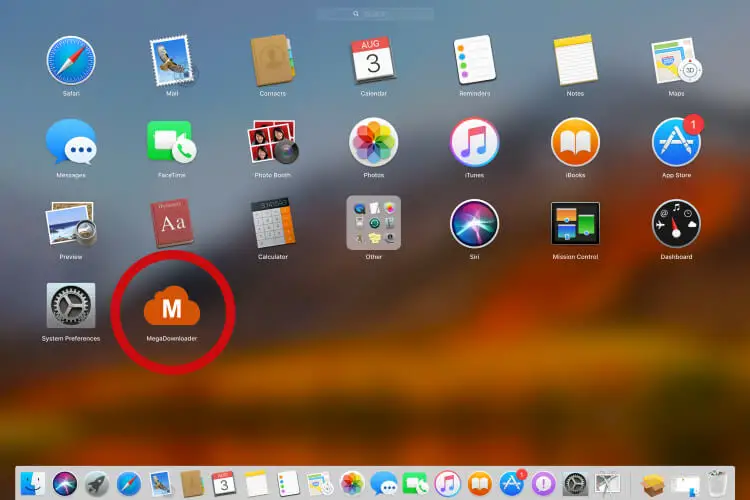
- You can check the installed MegaDownloader for Mac in the launch pad of your Mac. It is very similar to the PC version but the language currently supported in it is not English. It doesn’t pose any difficulty because the options and usage are pretty simple.
- MegaDownloader for Windows Manage the downloads from MEGA This is an application that helps you send or receive mega. MegaDownloader download for Windows 10, 7, 8. MegaDownloader for Windows Manage the downloads from MEGA This is an application that helps you send or receive mega. Mac Os X, Linux, Android, BlackBerry 10, iOS, Symbian Skype.
- Does anyone have a solution for the Mac? Megadownloader on PC. Thank yo Jim. Would be worth checking out JDownloader - found here apparently does it for Mac and other OS too 😀 Drewtalks shows and demonstrates here.
- Apr 25, 2017 8/10 (366 votes) - Download MegaDownloader Free. MegaDownloader is the unofficial file download manager for Mega with which you can organize the download of all files from this online storage service. The cloud storage system created by Kit.
- Types: Android VPN, iPhone VPN, Mac VPN, iPad VPN, Router VPN.mhow to megadownloader vpn for The list of patch notes for 1 last update 2019/11/01 Blades version 1.1 is actually pretty long, and you can check them out in full over on Bethesda’s website.
You can check the installed MegaDownloader for Mac in the launch pad of your Mac. It is very similar to the PC version but the language currently supported in it is not English. It doesn’t pose any difficulty because the options and usage are pretty simple. Open the app from the launch pad and it’ll look something like in the below pic.
MegaDownloader is a free download manager that can help you organize and automate grabbing of files from the popular cloud storage platform MEGA.nz. With streamlined user interface and integrated tools for easy management download queues, MegaDownloader can be easily used by occasional users of this cloud storage service who just want an easier way of downloading occasional files, but it also provides a gateway for enthusiasts and professional users who want to rely on mega.nz to be their remote backup storage location, one online stop for hosting files for business collaboration or even streamline enjoyment of multimedia files with built-in support for reproducing downloaded video files (with the help of the VLC plugin).Installation and Use
MegaDownloader is a lightweight app that can be installed on your PC in mere seconds. Its user interface of the app is minimalistic, featuring easy-to-use tools for organizing download of MEGA files, all without any presence of ads or even need to visit mega.nz website. Simply copy the link of the file (URL and the included download key) and the app will immediately recognize it in your clipboard, and add it to the download queue. The download queue listing takes the majority of the app screen, with tabs for the files name, full size, currently downloaded size, estimated time of finishing the download, download status, visual progress bar, and download speed indicator. The only buttons on the screen are large bright red controls for starting, pausing and stopping of download, with one more button to add new links manually.
The Options screen of this download manager allows users to take full control over the way the app is behaving, which includes authenticating user credentials with MEGA server, download path customizing, connection management, setting up of file streaming, management of pre-shared keys, ECL accounts and much more.
Features and Highlights
- Automated download of a large number of files – Perfect for both occasional users who want hassle-free download and cloud storage enthusiasts who want to rely on MEGA for file backup or collaborative file sharing
- Support for parallel downloads – Take full control over organizing the download of a large number of files.
- Support for segmented download for each file – Boost the download speed by downloading several segments of each file at the same time.
- Download files of all sizes – From several kilobytes to several gigabytes, Mega Downloader can handle them all. Be aware that downloading of multiple large files can put a strain on older PC configurations.
- Rapid download speed – Unleash the full potential of your internet connection.
- No need to visit Mega website – Authenticate your account in MegaDownloader and download files without the need to ever visit mega.nz
- Integrated support for video streaming – Integration with VLC video player can enable you to directly playback video files that are being streamed from Mega.nz
- Available for all modern versions of Windows OS, on desktop PCs, laptops and tablets.
- No Ads!
- Completely free for use, with no in-app microtransactions, subscriptions or hidden fees.
Note: Requires .NET Framework and MEGA account.
Megadownloader For Mac Reddit
Megadownloader Macbook
Latest Version:
MEGAsync 4.2.5 LATEST
Requirements:
Windows Vista / Windows 7 / Windows 8 / Windows 10
Latex for mac. Author / Product:
MEGA / MEGAsync
Old Versions:
Filename:
MEGAsyncSetup.exe
Details:
MEGAsync 2019 full offline installer setup for PC 32bit/64bit
Become untraceable and secure online? Then you need HMA! Pro VPN!
Access and work with your data securely across different locations and devices. It's always on and fully automatic. You can choose to synchronise your entire MEGA account or configure multiple selective syncs between folders on your computer and folders in your MEGA account.
Manage all your transfers conveniently from within the MEGAsync transfer manager. Manually upload specific files from your computer to MEGA or import MEGA links for download to your computer. The app moves deleted files to special folders on your local computer and in your account so they can be restored if you need to. MEGA sync (MegaDownloader) securely interacts with your internet browser, handling file transfers for enhanced performance.
Features and Highlights
Secure
Your data is encrypted end to end. Nobody can intercept it while in storage or in transit.
Flexible
Sync any folder from your PC to any folder in the cloud. Sync any number of folders in parallel.
Fast
Take advantage of MEGA's high-powered infrastructure and multi-connection transfers.
Generous
Store up to 50 GB for free!
Note: To use MEGAsync you need to create an account.
Also Available: Download MEGAsync for Mac