Project For Mac
Nowadays, project management is everywhere. Whether you have a team of one or 1,000 — you need to make sure everyone knows what to do, when to do it, and how much time to spend on it. Most companies employ a full-time project manager to oversee the work process, and the most essential tool they use in their work is some form of project management software.
- Microsoft Project For Mac
- Omniplan
- Ms Project For Mac
- Microsoft Project For Mac Free Download
- Microsoft Project For Macbook Pro
So what’s the best Microsoft Project alternative for Mac? What Is Microsoft Project On Mac Alternative? Naturally, since Microsoft hasn’t been in a hurry developing an MS Project for Mac build, lots of Mac-specific players have entered the game, occupying all possible niches based on cost, features, tech support, and more. Compiling and building in Visual Studio for Mac.; 2 minutes to read +3; In this article. Visual Studio for Mac can be used to build applications and create assemblies during the development of your project. MacProject was one of the first major business tools for the Macintosh which enabled users to calculate the 'critical path' to completion and estimate costs in money and time. If a project deadline was missed or if available resources changed, MacProject recalculated everything automatically. Project MAC's research staff peaked in 1967 at 400. Kenneth Flamm, Targeting the Computer Flamm The initial Project MAC contract (renewable 3 years ahead) had a yearly budget of 3 millions, except something less for the first year because ARPA had run out of money. Today, we are announcing the general availability of Office 2019 for Windows and Mac. Office 2019 is the next on-premises version of Word, Excel, PowerPoint, Outlook, Project, Visio, Access, and Publisher. Office 365 ProPlus, the cloud-connected version of Office, delivers the most productive. Popular Alternatives to Microsoft Project for Mac. Explore 25+ Mac apps like Microsoft Project, all suggested and ranked by the AlternativeTo user community.
Project management software helps teams plan, organize, and manage their work. There are lots of alternatives on the market: some are as simple as to-do lists and others include all the bells and whistles, like budget estimations, forecasting, and cost control. The most popular and widely used option by far is Microsoft Project.
Microsoft Project For Mac
Microsoft Project was first developed in 1984 as an MS-DOS application, even before there were graphical interfaces. Over the years, it has gained a loyal global following and has become the go-to tool for the majority of project managers.
Sadly, if you predominantly work on Macs, Microsoft hasn’t released a Mac-compatible version just yet, although the rest of the Microsoft Office 365 suite is available on Macs (short of Microsoft Access). So what’s the best Microsoft Project alternative for Mac?
What Is Microsoft Project On Mac Alternative?
Naturally, since Microsoft hasn’t been in a hurry developing an MS Project for Mac build, lots of Mac-specific players have entered the game, occupying all possible niches based on cost, features, tech support, and more. But to understand what makes a perfect competitor to Microsoft Project management software, we need to know what exactly Microsoft Project is revered for.
Microsoft Project supports all project management activities with:
Built-in customizable templates to quickly get up and running when new projects come in
Gantt charts to clearly see the timeline and the capacity for execution
Visual reports to evaluate progress on the go
Besides, Microsoft Project is a great tool for your business portfolio optimization and project evaluation to see where your organization is going and how it is doing. Finally, the software also does a continuous resource analysis, predicting bottlenecks and showing where resources are currently being underused.
So the ideal alternative to replace Microsoft Project for Mac needs to cover most if not all of these features and do it well. And maybe even have a few cards up its sleeve too. For example, Microsoft Project’s cost of $500–1500 per install or $30–60 per user a month is a likely target for other up-and-coming apps.
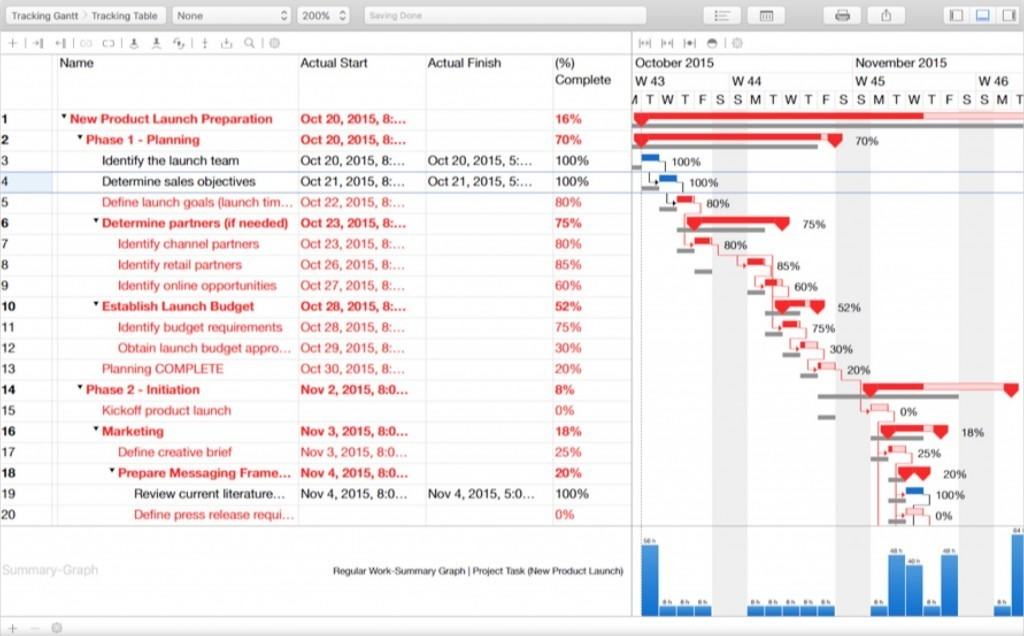
When we consider all available Microsoft Project alternatives, one stands out right away. In many ways similar to what Microsoft Project on Mac would be, it offers a more intuitive interface, easier onboarding process, and simpler cost structure. Meet Merlin Project Express.
Use Merlin Project Express as MS Project for Mac
Merlin Project Express is an all-in-one planning software that doesn’t constrain you into any project management paradigm. Control multiple projects, resources, and budgets with ease in the way that streamlines your own workflow.
Some notable features of Merlin Project Express include:
Outstanding planning tools. The app lets you create tasks, sort out dependencies, track progress, and schedule for the future — all on one screen.
By-the-minute tracking. See how much costs your project generates in real time. Check how busy and productive your team is, and how many hours a day get clocked in.
Custom templates. Create intuitive templates for all repetitive processes and have your colleagues fire up new projects in no time.
Precise resource management. Handle all information about your team, tools, and equipment in one secure place. Adding people is just as easy as dragging them from your Contacts, and the calendar view makes it effortless to see everything at once.
Accurate project timelines. When you have a large project on your hands, how do you predict its success? The best way to do it is to break everything down to smaller tasks, which don’t seem daunting and are much easier to keep track of.
Unlimited version-based attachments. Storing task-related information separately is a sure way to mismanagement on large projects. With Merlin Project Express, you just drop the required files right onto the task and it will keep it safe, including all the updated versions.
How to start with Merlin Project Express
The most special thing about Merlin Project Express is how intuitive it is. Everything you need to know is displayed on the main Gantt-like screen called Work Breakdown: the list of tasks goes top to bottom, and your timeline from left to right.
Additionally, you can add any extra information (e.g. activities, goals) by pressing the plus icon in the top left. And the activity panel on the right provides specific details about your plan and finances.
Clicking on the Work Breakdown, you can switch the screen to show Resources, which includes all the people in your team, their availability, rate, and accrued costs.
To add a task in Merlin Project Express:
Click on the dropdown beside the plus icon and choose Activity
Name the new activity
Drag it to the right line within the Gantt chart
Use the indentation icons beside the dropdown to properly place the task within the hierarchy
Once you have all the tasks arranged, your project will begin to take shape. Next you just need to add timelines and people responsible. Finish up with a few milestones, so you know when it’s time to check in on the progress. And just like that your project will be on its way to completion, with no Microsoft Project management software involved.
Best of all, Merlin Project Express is available to you on a free trial via Setapp, a platform of more than 150 Mac productivity tools and apps. And now when you know Microsoft Project for Mac is not needed, you can start substituting all the other Windows-only apps too!
Today, we are announcing the general availability of Office 2019 for Windows and Mac. Office 2019 is the next on-premises version of Word, Excel, PowerPoint, Outlook, Project, Visio, Access, and Publisher.
Office 365 ProPlus, the cloud-connected version of Office, delivers the most productive and most secure Office experience—with the lowest total cost of ownership for deployment and management. However, for customers who aren’t ready for the cloud, Office 2019 provides new features and updates to the on-premises apps for both users and IT professionals. Like Windows Long Term Servicing Channel (LTSC) releases, Office 2019 provides a set of valuable enhancements for customers who can’t be cloud-connected or receive regular updates.
Apr 06, 2019 For Mac users, the stalwart tool has been the Microsoft Remote Desktop connection. Available now through the Mac App store, it allows users to remotely connect to a Windows desktop. Dec 23, 2010 Apple Remote Desktop is the best way to manage the Mac computers on your network. Distribute software, provide real-time online help to end-users, create detailed software and hardware reports, and automate routine management tasks — all from your own Mac. Remote desktop applications for mac. Nov 27, 2017 Download Microsoft Remote Desktop 10 for macOS 10.12 or later and enjoy it on your Mac. Use the new Microsoft Remote Desktop app to connect to a remote PC or virtual apps and desktops made available by your administrator. Oct 17, 2013 Download Microsoft Remote Desktop 8 for macOS 10.9 or later and enjoy it on your Mac. With the Microsoft Remote Desktop app, you can connect to a remote PC and your work resources from almost anywhere.
The new enhancements in Office 2019 are a subset of a long list of features that have been added to Office 365 ProPlus over the last three years. Office 2019 is a one-time release and won’t receive future feature updates. However, we’ll continue to add new features to Office 365 ProPlus monthly, including innovations in collaboration, artificial intelligence (AI), security, and more.
Office 2019 delivers features across apps to help users create amazing content in less time. In PowerPoint 2019, you can create cinematic presentations with new features like Morph and Zoom. And improved inking features across the apps in Windows—like the roaming pencil case, pressure sensitivity, and tilt effects—allow you to naturally create documents.
Excel 2019 adds powerful new data analysis features, including new formulas and charts and enhancements to PowerPivot.
Omniplan
Word 2019 and Outlook 2019 help you focus on what matters most. Learning Tools, like Read Aloud and Text Spacing, make it easier to engage with your content. Focus Mode blocks out distractions and puts your content front and center. And Focused Inbox moves less important emails out of the way—so you can get straight to taking care of business. For a longer list of the new features in Office 2019, see our FAQs.
Office 2019 also includes new IT value for enhanced security and streamlined administration. We introduced Click-to-Run (C2R), a modern deployment technology, in Office 2013, and it’s now used to deploy and update Office across hundreds of millions of devices worldwide. With Office 2019, we’re moving the on-premises versions of Office to C2R to reduce costs and improve security. The advantages of C2R include predictable monthly security updates, up-to-date apps on installation, reduced network consumption through Windows 10 download optimization technology, and an easy upgrade path to Office 365 ProPlus. C2R offers the same enterprise-focused management capabilities as Microsoft Installer (MSI) based products and will also support an in-place upgrade when you move to Office 2019 from older MSI-based products. To learn more, refer to the Office 2019 Click-to-Run FAQ.
Ms Project For Mac
The 2019 release of Office products also includes updates to our servers, and in the coming weeks, we will release Exchange Server 2019, Skype for Business Server 2019, SharePoint Server 2019, and Project Server 2019.
Microsoft Project For Mac Free Download
Office 2019 is a valuable update for customers who aren’t yet ready for the cloud. And each time we release a new on-premises version of Office, customers ask us if this will be our last. We’re pleased to confirm that we’re committed to another on-premises release in the future. While the cloud offers real benefits in productivity, security, and total cost of ownership, we recognize that each customer is at a different point in their adoption of cloud services. We see the on-premises version of Office as an important part of our commitment to give customers the flexibility they need to move to the cloud at their own pace.
Availability
Microsoft Project For Macbook Pro
- Commercial volume-licensed (trusted) customers can access Office 2019 starting today.
- Office 2019 is now available for consumer and commercial customers. For consumer customers in China, India, and Japan, Office 2019 suites will be available in the next few months.
- Certain features are only available in the Mac or Windows versions of Office 2019. For details, see the FAQ.