Keypass For Mac
Windows office for mac. Office 365 customers get the new Office for Mac first. You’ll have Office applications on your Mac or PC, apps on tablets and smartphones for when you're on the.
Mar 29, 2019 How to Check for and Install Updates on a Mac Computer. Software updates keep your computer and programs secure, fix errors, and provide new features. Many apps that you install will get regular updates that can improve functionality. Mar 15, 2018 Office for Mac that comes with an Office 365 subscription is updated on a regular basis to provide new features, security updates, and non-security updates. The following information is primarily intended for IT professionals that are deploying Office for Mac to the users in their organizations. Important: If you don't see Check for Updates on the Help menu, download the latest version of the Microsoft AutoUpdate tool.Run the tool and then start over at step 1. The Check for Updates option now appears on the Help menu. Oct 18, 2019 Open the App Store app on your Mac. Click Updates in the App Store toolbar. Use the Update buttons to download and install any updates listed. When the App Store shows no more updates, the installed version of macOS and all of its apps are up to date. That includes Safari, iTunes, iBooks, Messages, Mail, Calendar, Photos, and FaceTime. 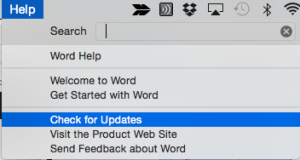 Microsoft AutoUpdate makes sure your copy of Office will always be up-to-date with the latest security fixes and improvements. If you are an Office 365 subscriber, you'll also receive the newest features and tools. Check for updates and install. Open an Office app such as Word, then on the top menu, click Help Check for Updates.
KeePassXC is a community fork of KeePassX, the cross-platform port of KeePass for Windows. Every feature works cross-platform and was thoroughly tested on multiple systems to provide users with the same look and feel on every supported operating system. This includes the beloved Auto-Type feature. Caution: I heard on a podcast that there was some major bug in KeePass 2.41 for Mac, if the KeePass database is stored inside a Veracrypt container. The database gets deleted. Not sure exactly which version (KeePass, KeePassXC, etc), and I didn't pay much attention because I'm not on a Mac. But you might check on this.
Open Source Password Manager 2019
The best way to give security to any file is through Strong Passwords. If the passwords are weak, then your data is not absolutely secure. Password is very important in the computer and internet world. If you’re a little careless, then your password can be trickled by a hacker or a bad person. So passwords such as protect one another, and passwords should be kept even more secure. You usually save your password on mobile or in a long time. But they are not so safe. Anyone can fall into the hands of anyone at any time. Then you will become his victim. All your important files, documents, or devices may be damaged. So KeePass 2019 is a suitable software to release from this tension. This is a free open source password manager. This is a simple software to keep your passwords safe.
KeePass For Windows 10, 8, 7, Vista
You can store your passwords in highly-encrypted databases by KeePass For Windows. No one can show or use your password app. By creating a database on this software, you can save all your passwords and keep them locked with numbers. But you can always back up the database and keep it in the pen drive for you. If your PC crashes in some way, the database will be very safe. Now KeePass 2.42.1 latest version available for Windows all operating systems like Windows 10, Windows 8, Windows 8.1, Windows 7, Windows Vista and, Windows XP. It also supports Windows 32bit and 64bit OS.
KeePass For Mac
FileOur.com offers the complete full version of KeePass for Mac PC to use in your personal computer. In this case, you have to check if the following tools are installed. .NET Framework 4.5, 4.8 or higher is installed in Win see .NET Framework. If everything is all right then download directly from this site and install it. You will find this software in a ZIP file. Please unzip it with 7-ZIP, WinZip or WinRAR. You can download the latest versions of this software from this site. It also is called password management software.
How To Use KeePass?
Keepass For Mac Download
Many of us do not know how to create a new database at KeePass safe. Even creating this database will cause problems. So follow the tips below to learn how to create a KeePass new database.
How to create a new database in KeePass?
Keepassx Mac
- First, download the software for free
- Install the software on your PC and open it
- From the File menu, click the New icon or press ‘Ctrl + N’
- Enter a specific name to create a new database
- Save in a random location
- Give a strong master password for the software
- Click ‘OK’
- Now configure your database settings
- Click ‘OK’ again
Keepass App For Mac
How to Create a New Entry Password in KeePass?
Download Keepass For Mac
- From the top menu, click Add Entry or press ‘Ctrl + I’
- Enter title, user name, password, website URL address
- If you want to note some information
- You can select the expires date of your lifetime
- At last press ‘Enter’ to save your new password