Ctrl Alt Del For Mac
I just hit CTRL + ALT + DEL whenever I get frozen on Windows PC, but what to do to when it happens on Mac? what is equivalent to CTRL + ALT + DEL on Mac?
Hit ‘command’ + ‘option’ + ‘esc’ simultaneously on keyboard, it’ll pops up ‘Force Quit Applications’ window then force quite the stalled application.
If Mac still frozen, try following buttons to restart/reboot Mac
Nor does turning on NumLock and hitting either CTRL-ALT.(period), CTRL-ALT.-Shift or CTRL-ALT.-Shift-Fn, (all in the hopes that many times the period key on a numeric pad doubles as a Del key), or CTRL-ALT-END or CTRL-ALT-TAB All of the foregoing were tired with various combinations of the Shift and Fn keys, to no avail. Jan 14, 2019 If you’ve recently switched to Mac from Windows, you’ll no doubt have wondered if there’s a Ctrl-Alt-Del equivalent for Mac. The command brings up a menu that is used on Windows to terminate a program/task, or reboot a system.
● hit ‘control’ + ‘eject’ simultaneously on keyboard. These keys pop up confirmation dialog asking “Are you sure want to shut down your computer now?”
● hit ‘command’ + ‘shift’ + q simultaneously on keyboard to quit all applications and log out now
Virtualization software for mac. If none of above steps is working, hit/press Power button for few minutes will force shutdown Mac

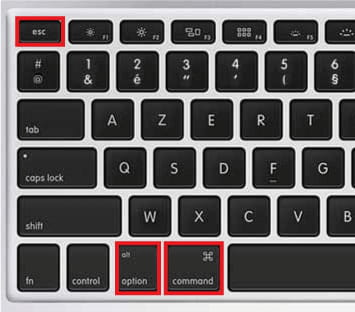
How do I use CTRL + ALT + DEL on a Mac computer?
The Mac equivalent of CTRL + ALT + DEL is Command + Option + Escape.
Hold down the CTRL and Option keys (located on either side of the space bar) then press the Escape key. Youtube downloader for mac. This will bring up the Force Quit window showing a list of your open applications. Choose one and press the Force Quit button to immediately end that application.
You can also force a hanging application to quit by right-clicking (CTRL + Click) on its icon in the Dock and choosing “Force Quit” from the context menu.
Macs have a separate key combination to force a reboot: Command-Option-Power. Hold down the Command and Option keys then press the power button to restart the computer.
To force the computer to shut down, hold down the power button for between 5 and 10 seconds.
Ctrl Alt Del Mac Keyboard
Forcing a reboot or a shutdown is not advised unless there is no other option. Performing these actions can result in data loss, especially if there are applications running or external storage devices connected. You should first try to correctly reboot or shut down the computer:
Ctrl-alt-del For Mac Remote Desktop
- The right way to reboot a Mac is to click Apple → Restart…
- The right way to shut down a Mac is to click Apple → Shut Down…