Alternatives To Itunes For Mac
- Best Alternatives To Itunes For Mac
- Itunes Replacement For Mac
- Best Free Alternatives To Itunes For Mac
- Itunes Alternative For Windows
There are many benefits of owning an iPhone, iPad or iPod and one of them is iTunes. iTunes is one of the most important software on which every iPhone user utterly depend on to transfer media/music files, software updates, to manage the device and more. With all these functions to perform with iTunes, there is a downside to it as well. It is not that iTunes is not great in looking but it is bloated. There is so much to do with iTunes but it can’t be all without fail. Moreover, it is not bad to have an best iTunes alternative which can serve you right.
Oct 18, 2019 Best iTunes Alternatives for Mac and Windows in 2019 #1. WinX MediaTrans. WinX MediaTrans is a fully featured iTunes alternative. With this software at your disposal, managing media will no longer be a hassle. It boasts rapid file transfer speed and claims to. If iTunes does not meet your needs, here UFUShare show you the best alternatives to iTunes. Apple's software is often criticized because of its difficulty of use, lack of some interesting functions, or the time it takes to perform the actions that are requested.
Best iTunes Alternatives 2019
1. TunesGo
TunesGo is one of the best alternatives to iTunes for your iPhone, iPad, and iPod. It easily transfers and manages your iPhone, iPad and iPod data on any PC or Mac. It allows you to edit, transfer, manage, backup, view songs, photos, videos, contacts, messages and more on iPhone, iPad, and iPod. It can also be used as iPhone Ringtone Maker, Phone to Phone Transfer tool and Gif Maker. You can backup your music, video, ringtone, camera roll pictures, apps and more. It is compatible with iOS 7, iOS 8, iOS 9, iOS 10, and iOS 11. This is a paid app.
Must Read:5 Best iPhone And iPad Cleaner Apps
2. MediaMonkey
Image Credit: Computer Bild.com
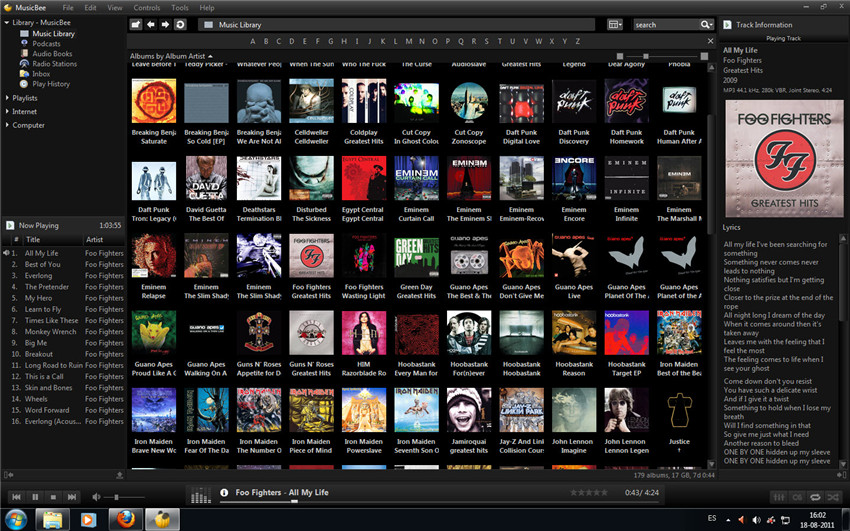
MediaMonkey is one of the Media Manager, CD Clipper and JukeBox and a perfect alternative to iTunes. It helps you manages thousands of audio and video files. It efficiently plays different audio formats. It adds the missing tags of the audio or video track to organize it seamlessly. It supports MP3< WAV, MP4, MPEG, PLS, ALAC and more. It syncs and backups with your iPhone, iPad, iPod, and Android. It also enables you to convert any audio or video files to almost format. You can also customize MediaMonkey with visualizations and skins. The app is both available in free and paid version.
3. Foobar2000
Foobar2000 is one of the best iTunes alternatives for your iPhone, iPad, and iPod. It is also compatible with Windows phone and Android. It supports MP4, MP3, AAC, WMA, Opus, FLAC, WAV, AIFF, WavPack, Musepack, AU, and more. It offers seamless playback. It supports full replaygain and has keyboard shortcuts. It has an easy customizable user interface. It also has advanced tagging capabilities. It has an open component architecture which allows third-party developers to extend the functionality of the Foobar2000. It is a free application.
Must Read: 7 Best To Do List Apps For iPhone
4. Ecoute
Ecoute is a lightweight and beautiful music player. It automatically detects and imports your iTunes library. It helps you control your music effortlessly and also integrates Facebook, Twitter to let you share your favorite tracks with others. It has a smart user interface that switches into night mode as soon as the screen brightness decreases. Moreover, it can stream songs that are not downloaded from iTunes Match yet. It let you easily control your music library and lets you quickly shuffle and play your favorite music. It is a free application.
5. DoubleTwist
One of the best alternatives to iTunes, DoubleTwist is an easy and simple tool to use which helps you manage your media files effortlessly. It lets you sync your iTunes playlist, ratings, and more to your phone, Mac or PC. It enables you to record iTunes radio and audio on your Mac or PC. You can browse and subscribe your favorite podcasts. In addition to this, it also syncs files from external devices. The app is both available in free and paid version.
Must Read: 5 Best Call Recorder Apps For iPhone
6. SynciOS
Best Alternatives To Itunes For Mac
Image Credit: Bitsdejour.com
A free alternative for iTunes, SynciOS is a wonderful app. It syncs music, video, photos etc from your PC to your iPhone, iPad, and iPod. It lets you easily access and view iTunes backups. It is a complete device manager that converts incompatible files to iOS device friendly.SynciOS app gives you important information related to your devices. The app is free and just available for Windows.
7. PodTrans
Image Credits: AlternativeTo.com
PodTrans is a cross-platform app and is one of the best alternatives to iTunes. It has almost all the features that are expected out of the conventional device manager but it doesn’t need to get installed to transfer music to and from an iPhone/iPod. It is easy to add or remove things, all you need to do is drag n drop. It enables you to download online videos directly to iPhone/iPad. The app is free music management software.
Next Read: Best Video Editor Apps For iPhone
So, this is the list of some of the best alternatives to iTunes for your iPhone, iPad, and iPod. Try them out and let us know which is your favorite.
Read this guide right now to grab several top iTunes alternatives at the market so far. Choosing the best one for yourself and making iPhone iPad iPod touch content management much easier.
AnyTrans® for iOS – Best Alternative to iTunes
AnyTrans for iOS is the perfect application to replace iTunes to manage your iPhone iPad iPod touch content, backing up, transferring various iOS data from iDevice to computer, from computer to iDevice, and also between iDevices, etc.
iTunes Tips & Issues
iTunes Basic Learning
iTunes Converting Tips
iTunes Music Tips
iTunes Libary Tips
iTunes Connection Issues
iTunes Data Loss
Other iTunes Issues
Seeing a lot of dodgy threads about iTunes and SL not getting on well together. I use iTunes for ripping, burning and converting. Could anybody recommend something better?? (OSX) Thanks in advance.
- from serato forum
Truly, iTunes brings lots of convenience to iOS users, for iOS data managing, migration, syncing, backing up, restoring, and more, but it becomes less and less popular, because of its many unfriendly design, feature, and functions.
- iTunes is time consuming, during syncing, backing up, and restoring.
- iTunes only supports iOS data transferring from iTunes (or PC/Mac) to iDevice, not including between iDevices, and from iDevice to computer.
- For iTunes music management, only purchased songs are allowed to sync to iTunes; iTunes songs syncing to iPhone iPad iPod touch would erase the existed one on iDevice.
- iTunes is with poor operability. Many users cannot operate it intuitively.
- Many iTunes errors occur during operation, such as can not synchronize, can not back up, iTunes error 14, iTunes Library.itl cannot be read, etc.
- And more..
So there is no surprise about people looking for another application to replace iTunes. However, there are lots of iTunes alternative applications out there. It is hard to choose the perfect one for every user. So to make it much less troublesome, our team have collected 5 top applications, which can totally replace iTunes, for you, base on common need for iTunes: Backing up, restoring, and music files managing. Keep reading and find the best one for yourself now.
Part 1. Best iTunes Alternatives for iPhone iPad iPod touch Backup
Backing up iPhone iPad iPod touch is an inevitable and must-do thing, in case of data disappearing unexpectedly. So in this part we will list three best alternatives to iTunes you can choose, making iPhone iPad iPod touch backing up more quickly, and easily.
1. AnyTrans for iOS - Selectively and Wholly Backup
We know that iTunes backup usually is a long journey. Besides, iTunes backs up the whole device to computer, but mostly without media files, songs, videos, etc. and you cannot choose the certain data type. While, the biggest problem is under the backup files, you have no option to view them. But now, with AnyTrans for iOS, you will never suffer from such pains any more.
- It jus takes a few minutes to back up your whole iPhone iPad iPod touch.
- Not just wholly backup, it also enables to choose the exact data types, like contacts, photos, messages, etc. to save them on computer (PC/Mac).
- Provides common formats for data outputting, like .csv and .vcf for contacts, html and pdf for messages, etc. So these backup files are readable and printable.
- Also supports couple easy ways of iOS data managing, transferring data from iDevice to computer, from computer to iDevice without data erasing, from Android to iDevice, and between iDevices, deleting, ringtone making, and more.
So why not download it now, and follow the steps below to back up your device wholly and selectively, right away?
How to Backup iPhone iPad iPod touch Wholly with AnyTrans for iOS
Step 1. Run AnyTrans for iOS on your PC/Mac > Connect your iDevice to it > Choose Backup Manager tab > Click on “Please click here to backup your content” if you have no backup on computer; While if there is one, or more backups on computer already, it will show them all.
Step 2. After it finishes backing up, you can now open the backup file to view all titles in it.
How to Backup iPhone iPad iPod touch Selectively with AnyTrans for iOS
Itunes Replacement For Mac
Step 1. Run AnyTrans for iOS on your PC/Mac > Connect your iDevice to it > Choose Content Manager > Scroll down to category page.
Step 2. Choose the data type you would like to backup to computer. Here we take Contacts as an example. So choose contacts > Select the ones you want to backup > Click on Send to PC (or Mac) button to start.
Step 3. Before you start backing up, you can set the output formats in settings.
2. TunesGo - Selectively and Wholly Backup
TunesGo is a simple iTunes alternative to manage files on your iPhone, iPod, and iPad. It allows you to add music, videos, apps, etc. from a PC to an iPhone without iTunes. Just like AnyTrans for iOS, TunesGo also provides with two backup methods: wholly and selectively. But at our test, it will occasionally be stuck on backing up, or much time consuming.
Pros:
Best Free Alternatives To Itunes For Mac
- Two backing up methods - wholly and selectively.
- Easy to use.
Cons:
- Occasionally stuck on backing up process, and time consuming.
3. SynciOS Data Transfer - Selectively
SynciOS Data Transfer offers the common functions that users need to sync music, videos, photos, etc. from a PC to iPhone, iPod, and iPad. During the process of importing songs and videos to device, it will convert the incompatible files to iDevice friendly formats. It allows users to backup media files, like songs, photos, and videos from iPhone, iPad, and iPod to PC. But there is no one-button-backup feature. It will scan your whole device firstly, which costs some time at our test, and then you can choose the data types to backup.
Pros:
- Back up data option with selecting.
- Has syncing capability.
- Fast media transfer.
- Gives additional information on connected devices, thus warning you in case of any problems with the device.
Cons:
- No on-button operation for whole device backup.
- Need scanning device firstly. Time consuming.
- Has an issue with managing contacts.
Itunes Alternative For Windows
Part 2. Best iTunes Alternative for iPhone iPad iPod touch Restoring
When iPhone iPad iPod touch lose some data accidentally, due to iOS upgrading, jailbreak, mistakenly deleting, etc., you can restore those data from iTunes backup normally.
However, iTunes restoring is a long long way. Besides, technically, the whole process is replacing the whole device with the backup, which means your existed data on iDevice will be erased. You have no way to choose just the lost data to recover.
But with some great iTunes alternatives, you will not be troubled by such problems any more. What tools deserve your trying? And here are PhoneRescue for iOS, Syncios Data Transfer, and MobileTrans.
1. PhoneRescue for iOS - Not Just iTunes Restoring
So, in this part, we recommend you one powerful alternative to iTunes, to get rid of such annoying things. And it is PhoneRescue for iOS.
- PhoneRescue for iOS enables you to choose the exact data type in iTunes backup to scan. And its Data Comparison feature will easily find the different data in backup from data on iDevice, which saves a lot of your time.
- After scanning, you have the option to choose the certain titles you would like to restore.
- The whole process will not erase any existed data on your iDevice.
- Also supports recovering from device directly, and from iCloud backup.
So go to download PhoneRescue for iOS now, and follow the steps below to get back your lost data from iTunes backup quickly.
How to Restore iPhone iPad iPod touch from iTunes Backup with PhoneRescue for iOS
Step 1. Run PhoneRescue for iOS on your PC/Mac > Choose Recover from iTunes Backups > Click right arrow to continue.
Step 2. Choose the iTunes backup, which contains the lost data > Click right arrow > It will pop up a screen for Data Comparison option.
Step 3. Here we take Only Scan Backup option as an example. And then another page pops up for choosing what kind of exact data types you would like to scan. Taking Photos as an example > Click on OK button to continue.
Tip: If your iTunes backup is encrypted, please input your encryption password to allow PhoneRescue for iOS to scan your data. If you forgot it, you can make use of iPhone backup password recovery to get it back.
Step 4. It will start scanning all photos in iTunes backup. After finishing, select the photos you would like to recover > Click on To Device button to download them to your device directly, or To Computer button to save them to computer.
The DivX codec is now more powerful and easier to use than any previous versions. With the DivX codec, you can be certain that you will get the highest quality, performance and compression from your digital videos.The DivX Converter is a stand-alone DivX encoding application for the Mac allowing you to convert nearly any digital video to DivX in one step, radically simplifying the conversion process, making it easier than ever to create high-quality, highly compressed DivX videos. More importantly, the DivX codec is fully compatible with QuickTime and 7 and Mac OS X 10.3.9 or later. Divx player for mac. However, because we know you still want precise control over the encoding process, the DivX Converter for Mac also provides tools to customize the advanced encoding settings of the DivX codec.The DivX Web Player is a versatile utility that allows you to embed DivX videos directly on to a web page.DivX for Mac also provides DivX playback support to the Mac platform.
2. Syncios Data Transfer
Just like PhoneRescue for iOS, Syncios Data Transfer also enables you to restore data from both iTunes and iCloud backups. But there seems no directly recovering from the device. But with its iTunes restoring feature, you can transfer any data type you want to your iPhone X/8/7/6s/6.
Pro:
- Besides Restore from iTunes Backup, there is also Restore from iCloud.
Cons:
- No retrieving from iPhone iPad directly.
- No previewing for detailed items in iTunes Backups.
3. MobileTrans
MobileTrans is also a great helper for your iTunes backup restoring. But it seems like Syncios Data Transfer, there is no recovering from iDevice, even though you can get back data from several clouds, like iCloud, OneDrive, BlackBerry, and Kies. MobileTrans does not support iTunes backup files previewing, either.
Pro:
- Besides Restore from iTunes Backup, there is also restoring from clouds.
Cons:
- No retrieving from iPhone iPad directly.
- No previewing for detailed items in iTunes Backups.
Part 3. Best iTunes Alternative for iPhone iPad iPod touch Music Managing
Many users rely on iTunes, mainly for music files managing. However, only purchased songs on iPhone iPad iPod are allowed to sync to iTunes; While iTunes songs syncing to iPhone iPad iPod touch would erase the existed one on iDevice. And there is no function to transfer songs between iDevices.
So for better music managing experience, we recommend you two alternatives to iTunes to help you with it. They are AnyTrans for iOS and TunesGo.
1. AnyTrans for iOS - Satisfy your all possible operations for music
- AnyTrans for iOS can sync all songs on iDevice to iTunes, PC, and Mac, no matter its purchased, or downloaded form other source.
- When you sync songs from computer to iPhone iPad iPod touch, it will not erase any existed data on device.
- Besides, it also supports music transferring between iDevices, and songs deleting.
Give AnyTrans for iOS a trial now, and take the following steps to begin with your music managing.
How to Manage Music on iPhone iPad iPod touch with AnyTrans for iOS
Step 1. Run AnyTrans for iOS > Connect your iPhone iPad iPod to it > Scroll down to category page.
Step 2. Choose Music under Audio option.
Step 3. Now to add music from computer to iOS device, you can click button. And if you want to delete unwanted music, please click button. By clicking button, you can transfer music to iTunes. You click button to transfer songs to computer. You can also transfer music between iOS devices by clicking button.
Note: For better management of your music, you can change the preview mode by clicking . If AnyTrans for iOS doesn’t load your music correctly, please click button to refresh it.
2. TunesGo
TunesGo provides you with various iOS data managements. Under Music tab, you can see Music, iTunes U, Podcasts, Ringtones, and Audibooks on your iPhone iPad iPod touch. But we found that TunesGo seems only find the songs stored on in Music app, not including those not in app but on iPhone storage.
Popular Articles & Tips
How to Transfer Contacts from iPhone to iPhone Directly >Top 15 Tips for Saving Battery on iPhone iPad >Quick Solution to iTunes Syncing Problems >Product-related questions? Click here to get quick solution from our Support Team >>
AnyTrans
Best iTunes Alternative Managing Your iPhone iPad iPod Well
Get It Now Single License (1 Year)60 Days Money Back Guarantee
This is the best option if you don't have a copy of the iPhone content on a PC/Mac. AnyTrans enables you to manually manage the content on your iPhone.By Lou Hattersley Mac World UK
All of the main options are clearly laid out, and even those with little computer experience will have no problem manually extracting iPhone backup files.'By Softonic Team Softonic
AnyTrans for iOS is definitely a reliable and practical solution if you’re looking for a safe and fast way of transferring files between your computer and iOS devices. By Alexandru Chirila SoftPedia