Vnc For Mac
Download VNC Viewer Latest Version for Windows, Mac & Linux – Virtual network computing (VNC) is a remote control software that allows controlling other computers through a network connection. Keyboard and mouse click printing is sent from one computer to another so that one can manage a desktop, server and network-connected devices without having to be in the same location. VNC works on client OR server models. A VNC Viewer (or client) is installed on a local computer and connected to a server that must be installed on a remote computer. The server sends duplicates from the remote computer display to the viewer (client). The server also translates commands from the viewer and applies them to remote computers.
VNC is platform independent and compatible with any operating system. The computer must be on a TCP or IP network and have an open port for traffic from the IP address of a device that will control. VNC was developed at AT& T Laboratories. The original VNC source code is open source under the GNU General Public License and the other types also exist commercially. Real VNC is software that is used to remote desktop your computer using a LAN or Internet network connection, where real VNC can be used in all System Operations namely Windows, Linux or Macintosh or Android. This software consists of 2, namely VNC Connect (for creating VNC servers) and VNC Viewer (for remote VNC servers).
Warning: Outlook data will be removed when you move the three folders listed in this step to Trash. Microsft office for mac.
How to Use VNC Viewer
VNC® Connect delivers secure remote access that connects your people to business-critical resources, sharing and collaborating more efficiently. Bring your own device (BYOD) An explosion of inexpensive devices is changing the way your business and employees interact. Vnc for mac free download. TurboVNC TurboVNC is a high-performance, enterprise-quality version of VNC based on TightVNC, TigerVNC, and X. Oct 23, 2018 VNC enables you to remotely access and control your computers from another computer or mobile device, wherever you are in the world. GlacSoft LLC hasn't yet released TightVNC for Mac, but you can find many similar desktop sharing applications that enable you to control your computer remotely. This list of alternatives will allow you to find programs that can perform all the operations that TightVNC for Mac would do. VNC Server or Enabling Screen Sharing. The VNC Server is the application running on the computer, or device, which screen is being shared. This can be your Mac, a Windows or Linux PC, or even an Android tablet, or iPhone (jailbreak needed to run Veency, the VNC server for iOS). The original and best for remote access across desktop and mobile. VNC® software enables you to remotely access and securely control your desktop or mobile device. Your computer whenever and wherever you need it.

For this time I will review how to remote your PC with VNC Viewer on your Android phone or Android tablet. For the steps as follows:
But if you want to roll your own:. Idle mac os. On my Mac right now (early 2016), running python 2.7.10, it is 'idle2.7'. You'll need to know the terminal command to open your version of IDLE.
- Download VNC Viewer software first
- For VNC on Android, you can download directly from Google Play (your Android market) but you need to spend to buy the application, but many people have uploaded again on other sites, please search for yourself VNC on Google play:
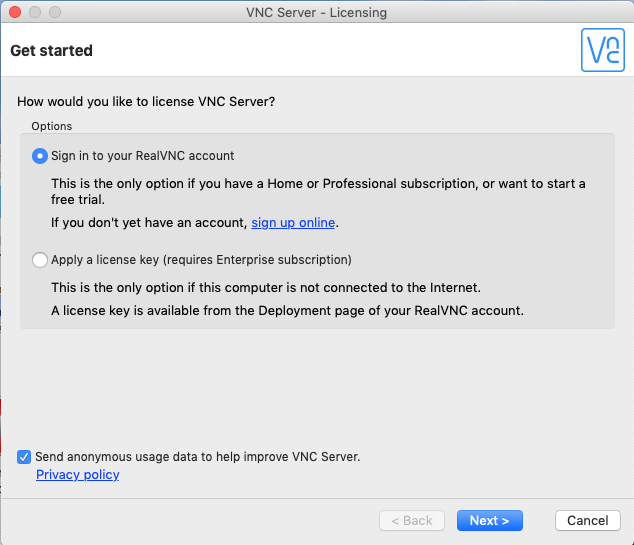
- Install all VNC on your PC and VNC on your Android, when you finish installing on your PC VNC server will ask for code license to use, select to via internet and you will be asked to register to get the license code serial. The license can be used for only one month.
- After installing everything, open VNC Server on your PC
- After it is open, and the server automatically runs, in the display, you can enter the IP address listed there to be included in the VNC that will restart it.
- There is clearly stated you can use the browser to remote but must install Java first. In the Connectivity menu is the IP address that can be on the remote or your network that is connected. If you are connected to a modem and you can remotely use the internet using the public IP.
- After it is activated, set the password on the VNC Viewer server so that other people cannot remotely remote your PC, other terms your remote desktop is protected by the password that you provided. open in “More “- and choose “Options menu’.
Now you can control your PC via this software.
Download VNC Viewer Latest Version
- Download VNC Viewer for Windows – Download
- Download VNC Viewer for Mac OS – Download
- Download VNC Viewer for Linux – Download
Macos Vnc
Note: Download VNC Connect to the computer to control, and download VNC Viewer to the device you want to control from.