Vm Fusion For Mac
- Vm Fusion Mac Keyboard Shortcuts
- Vmware Fusion Mac
- Vm Fusion For Mac Not Working
- Vm Fusion For Mac Crack
Virtual machines are a great alternative to partitioning your hard drive to install Windows using Boot Camp. It means you can use Windows in a window (excuse the pun) or even full screen if you want, and you don't have to cut the amount of space your hard drive has for your current computing needs.
- Sep 21, 2015 How to install windows 10 on a mac using vmware fusion? How to get VMware Fusion 8.5 Pro for FREE! Run windows and Mac at the same time!
- Compare Parallels Desktop and VMware Fusion side by side to find the best virtual machine software for Mac. Discover reviews, free trials and special offers for Mac virtualization software.
I recently explained how to get the Parallels Desktop virtual machine on your Mac. If you're interested in Parallels, check out my installation guide:
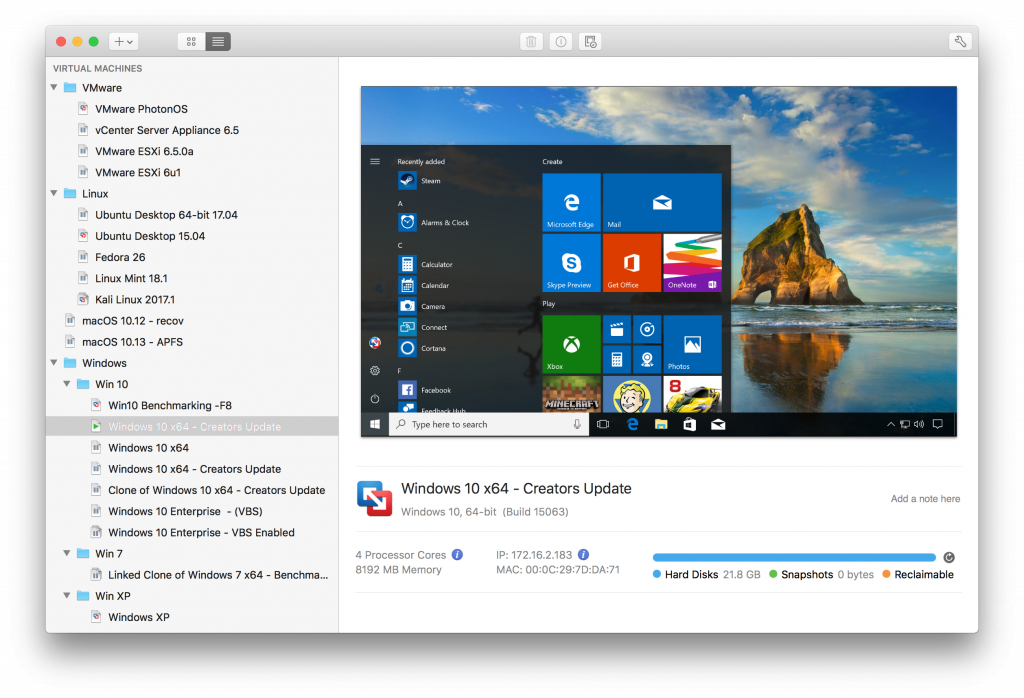
VMware Workstation and VMware Fusion: Mac, Windows and Linux Virtualization. With more than 15 years of virtualization excellence and over 50 industry awards, VMware aims to provide the most stable and secure local desktop virtualization platform in the industry. Ensure users can work anytime, anywhere and on any device with VMware Workstation and VMware Fusion. Fusion creates the virtual machine, opens the operating system installation assistant, and installs VMware Tools. VMware Tools loads the drivers required to optimize a virtual machine's performance. Mac OS X, OS X, or macOS virtual machines that you create in Fusion can run on any Apple-branded hardware that uses Intel processors. VMWare Fusion for Mac. This is where VMWare Fusion is important. VMware Fusion utilizes current Mac’s Intel VT feature present in the microarchitecture platform. Much of the underlying technology in VMware Fusion is inherited from other VMware products; such as VMware Workstation, allowing Fusion to offer features such as 64-bit mode and SMP support.

I'm covering all the major virtual machines for your benefit and this time it's all about VMWare's Fusion 11.5 virtual machine software. They're similar, but have a few different steps in the set up process.
Here's how to get VMWare's Fusion 11.5 on your Mac and then install and run Windows 10 from within your macOS operating system without having to switch hard drive partitions.
Check your system and hardware requirements
Before you get started with installation of Fusion 11.5, make sure your Mac meets the minimum system requirements for both hardware and software.
The minimum system requirements for installing and using VMware Fusion 11.5 are:
Hardware
- All Macs launched in 2011 or later are supported (except the 2012 Mac Pro 'Quad Core' using the Intel Xeon W3565 Processor. The CPU architecture is incompatible).
- Also supports the 2010 Mac Pro 'Six Core', 'Eight Core' and 'Twelve Core' models.
- Minimum 4GB of RAM
- 750MB free disk space for VMware Fusion and at least 5GB for each virtual machine
Software
- Mac OS X 10.13 or later
- Operating system installation media (disk or disk image) for virtual machines.
- Microsoft Windows is not included with VMware Fusion.
- Recommended graphics hardware for Windows DirectX 10 or OpenGL 3.3 support:
- NVIDIA 8600M or better
- ATI 2600 or better
- Minimum requirements for Metal support.
Before you start: Back up your Mac
This is one of those awful mistakes that people make, thinking that they don't need to back up their Mac before doing something big. First off, you should be backing up your Mac on a regular basis, but even if you don't do so multiple times per day, you should definitely do so right now, before you continue with this guide. Seriously. Back it up.
Vm Fusion Mac Keyboard Shortcuts
How to run Windows 10 on Mac using Fusion 11.5
You'll need a copy of Fusion 11.5 or Fusion 11.5 Pro in order to install it on your Mac. Fusion 11.5 costs $79.99 and the pro version costs $159.99. The main differences between them is in the advanced features. The Pro version includes extra features specific for multiple-computer use. For example, if you to be able to create linked clones on different Macs or if you need to network your computers together. You can buy the full license right now or download a free 30-day trial and make your full purchase later. If you have an older version of Fusion, you can upgrade for less.

You'll also need a copy of Windows 10. You might already have a full copy or you might need to buy a copy. VMWare requires that you have a copy on a disk, drive, or an ISO image file in order to run it on your Mac.
Download Windows 10
- Navigate to the Microsoft Windows 10 ISO download page from your web browser.
- Click on Select Edition and select Windows 10.
Click Confirm.
Bitdefender adware for mac. Information about products not manufactured by Apple, or independent websites not controlled or tested by Apple, is provided without recommendation or endorsement. If you continue to see advertising or other unwanted programs on your Mac, contact Apple.
Source: iMore
- Click on Select the product language and select your language.
Click Confirm.
Source: iMore
- Click on 64-bit Download.
Click Save to start the download.
Source: iMore
This may take a while, so have a cup of tea and watch an episode of Black Mirror while you wait.
Download and install VMWare Fusion 11.5
The first step is to download Fusion 11.5. You can buy a full license right now or download the free 30-day trial to get started.
Once the program download is complete, follow these steps to install Fusion 11.5 on your Mac.
- Double-click on the VMwareFusion.dmg file to open it (it might be in finder or on your desktop. You can search for it in Spotlight if its not easy to find).
Double-click on Double-click to Install.
Source: iMore
- Click Open if prompted to confirm that you want to open the application.
- Click one of the options for how you want to install Fusion 11.5, either with a license key, by purchasing now, or by using the free 30-day trial.
- Click Continue.
- Select whether you want to install Fusion 11.5 or Fusion 11.5 Pro if you're running a trial version.
Click Continue.
Source: iMore
- Enter your Mac log in credentials when prompted.
- Click OK.
Drag the ISO Windows 10 file to the Installation Method Window.
If you're installing from a different method, select that method and follow the steps to install.
Click Continue.
Source: iMore
- Tick the box for Use Easy Install. If you feel comfortable setting up the installation settings manually, uncheck the box.
- Create a Windows login account name and password.
- Enter the Windows Product Key.
- Select the Windows version you're using.
- Select the level of integration. If you want to share your Mac documents with Windows, you'll want More Seamless. If you prefer to keep Windows and Mac data separate, use More Isolated.
Click Continue.
Source: iMore
- Click Finish.
Click Save to save this new virtual machine to your Virtual Machines folder.
Source: iMore
After Windows finishes installing in the virtual machine, Windows 10 will pop up in a new window. It sort of looks like you're just using a new program or web browser, but you've got a virtual simulation of Windows 10, in its entirety right on your Mac!
Any questions?
Do you have any questions about how to run Windows 10 on your Mac using VMware's Fusion 11.5? Put them in the comments and I'll help you out.
MacBook Pro
Main
We may earn a commission for purchases using our links. Learn more.
Set-top of the pileSurvey suggests nearly a quarter of U.S. Apple customers own an Apple TV
Research conducted by Consumer Intelligence Research Partners has revealed that almost 25% of US Apple Customers own an Apple TV.
VMware Fusion
Select the relevant installation package to download from the tabs below. You may be prompted to log in to complete the download. If you do not have a profile, you may be asked to create one before being able to complete the download process.
Get Your License Key
Your license keys are available on the My VMware License Key page or available on your licensing confirmation email or product registration card located inside your box.
Technical Support
Take advantage of your Support and Subscription contract by accessing the My VMware Get Support page. Your VMware Fusion 11 license entitles you to 18 months of complimentary email support from the date of product registration. Telephone support is available by purchasing Per Incident Support (for all Fusion customers) or Basic Support (for Fusion 11 Pro customers only with a minimum quantity of 10) from the VMware Online Store.
Vmware Fusion Mac
Product Resources
| Product | Release Date | ||||
|---|---|---|---|---|---|
| VMware Fusion 11.5.0 | |||||
| |||||
Vm Fusion For Mac Not Working
| Driver / Tool | Release Date | ||||
|---|---|---|---|---|---|
| VMware Fusion Drivers and Tools | |||||
| |||||
| Custom ISOs | Release Date | ||
|---|---|---|---|
There are no custom ISOs available for this product. | |||
Vm Fusion For Mac Crack
| Product | Release Date | ||||||||||||||||
|---|---|---|---|---|---|---|---|---|---|---|---|---|---|---|---|---|---|
| VMware Fusion Open Source | |||||||||||||||||
| |||||||||||||||||