Solitiare For Mac
Jul 21, 2019 You could have the Bobby Movie for Mac as well. The Bobby Movie is a trending app that is great to watch all your favorite movies as well as TV Shows. The best part of having it on your Mac is that you get to look through a big screen which is going to be amazing. Bobby movie for mac. Sep 16, 2017 On this page, you can find the Bobby Movie Box Download links for PC, Android, and iOS.The Bobby Movies is an excellent app which is the best entertainment for friends and family. You can stream a large number of TV shows and Movies for free and it is very comfortable to use. Sep 16, 2017 Bobby Movies is a fantastic video streaming Application where you can find a large number of latest movie collection. With Bobby Movie Box for PC, you can watch all the movies and TV shows for free with a good internet connection.The Movie Bobby APK.
Solitaire TriPeaks For PC Windows 10/8/7 & MAC DOWNLOAD. How to Install Android Apps on PC [Laptop & Mac]. Solitaire TriPeaks For Windows Free Download – Play Now.
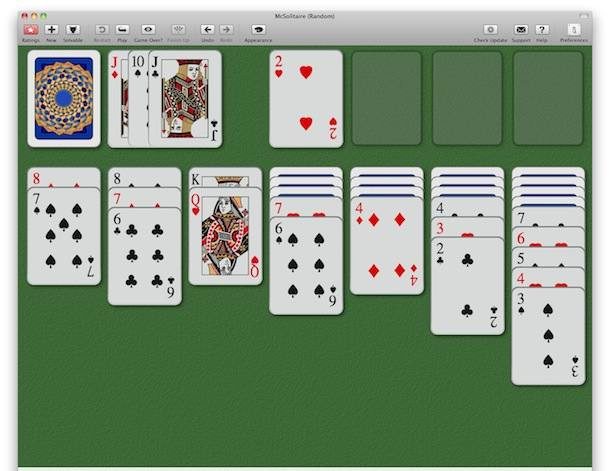
Download Free Solitaire! For macOS 10.7 or later and enjoy it on your Mac. Free Solitaire! Is a completely free version of the very popular Klondike game, which most people just call 'solitaire'. The game includes options for one- or three-card draws from the stock. Sep 19, 2010 McSolitaire is great, it automatically saves and resumes games, offer tons of customization and theming options, and best of all is totally free to download, which puts it right as my #1 Mac Solitaire client. There are some other pretty junky solitiare apps for Mac out there but this one is the best that I’ve used by far. Popular Alternatives to Microsoft Solitaire Collection for Mac. Explore 7 Mac games like Microsoft Solitaire Collection, all suggested and ranked by the AlternativeTo user community. A beautiful, themed collection of classic solitaire card games. If you're looking for more info about Microsoft. Solitaire, also known as Patience, is one of the most famous types of card games where your goal is to arrange the given cards in the correct order. If you want to play Solitaire on Mac, then you can try any of the Solitaire games for Mac from the following list.
- Solitaire For Your Mind. Solitaire (also called patience) is a mind game, it is considered by many to be the most recognized card game created. It is also believed that playing Solitaire is a good exercise for the mind and a lot of people are making it a daily habit to play at least one game of solitaire a day.
- Solitaire Perfect Match is an entertaining game for Mac users of all ages where your objective is to match the identical cards from the board. Not an alternative? Report a problem.
Solitaire TriPeaks Description:
About
Win, play and contend with Solitaire TriPeaks – the fun, free card game. It’s Solitaire with an amazing turn! On the off chance that you want to play and win a game of Klondike, Freecell or Pyramid, Solitaire TriPeaks is the card game for you!
Contend, play and win – 5 reasons why you’ll want to play Solitaire TriPeaks!
♠ Play Solitaire TriPeaks and win additional coins – New rewards regular!
♦ Compete and win levels in a hurry – Play and win wherever you are.
♥ Free and fun rewards are hanging tight for you – Discover them today!
♣ Win and contend – Play and contrast scores and companions or go up against yourself.
♠ Fun and allowed to play – There’s no charge when you need to play Solitaire TriPeaks.
More
Contend every day to win a wide cluster of focuses and release huge amounts of experience with Solitaire TriPeaks. Your gaming abilities will be put under a magnifying glass as you play with time as the opponent to win coins and the opportunity to find new dimensions. Envision Spider Solitaire, Freecell or Klondike yet much all the more astounding!
Solitaire TriPeaks is brimming with exciting difficulties and as you advancement to each new dimension you’ll get the chance to incapacitate traps, trigger supporters and contend to win concealed cards! Rather than Freecell, Pyramid or Spider Solitaire, give Solitaire TriPeaks a spin! It’s the main stunning game you’ll need to play!
Win quick and have a ton of fun each time you play! With more than 2000 dimensions to rush your way through – there’s no restriction to the undertakings hanging tight for you.
Play Spider Solitaire, Pyramid, Klondike or Blitz constantly?
Why not take a stab at something new? Contend with yourself to beat your very own records or test your companions and after that look at your scores on the leaderboard!
Any card gamer who likes Blitz or Freecell will love Solitaire TriPeaks. Nothing beats the energy of opening another dimension and this game will turn into your most recent fixation! Test yourself and start your adventure toward turning into the lord of Solitaire TriPeaks today!
Download today to begin winning focuses and barrage through your next dimension. Start your energizing experience with Solitaire TriPeaks today!
Protection Policy:
http://gsngamesnetwork.com/privacy.html
Solitaire TriPeaks App Tutorial:
Recent Post:
Solitaire TriPeaks Download Apk For Android
Solitaire TriPeaks PC GUIDE:
BLUESTACKS EMULATOR TO DOWNLOAD Solitaire TriPeaks ON PC (WINDOWS)
- Step 1: Download Bluestacks 4
[su_button url=”https://www.bluestacks.com/bluestacks-4.html” target=”blank” background=”#901f1b” size=”8″ center=”yes”]BLUESTACKS 4 FREE DOWNLOAD[/su_button]
- Step 2: Download Solitaire TriPeaks From Android > GOOGLE PLAY STORE or iPhone > APP STORE.
The quickest Android Gaming Platform for PC
With BlueStacks, you don’t need to attach yourself to a charging link in light of the fact that your telephone has 9% battery left or turn ‘Don’t Disturb’ on so you don’t get murdered mid-fight.
BlueStacks 4 conveys diversion free mobile gaming to the following dimension with lower memory use, bring down CPU use, and fundamentally enhanced gaming execution.
Changing Your Computer into the Best Mobile Gaming Device
Join over 300+ million individuals playing their most loved mobile games on their PCs and Macs on the world’s most well known Android Gaming Platform – BlueStacks. With clients over the larger part of a world, the BlueStacks gamer network consistently obscures the lines among mobile and PC gaming.
BlueStacks isn’t an Android Emulator. BlueStacks is the best Android Gaming Platform on Earth and it can transform your PC into the best mobile gaming Device – period.
What’s going on in BlueStacks 4?
- Elite more than ever;
- 6x quicker execution than Samsung Galaxy S9+;
- 8x quicker execution than BlueStacks 3;
More straightforward UI
- Use BlueStacks for playing or accomplish more: The decision is yours;
- Center game playing capacity as a major aspect of principle UI;
- Extra Features like BlueStacks Store, Quests, accessible freely, expend assets just once propelled;
As good as ever Keymapping
- Oversee key controls with the all-new Game Controls Window;
- Enter Controls partitioned into classifications for the less demanding route;
- Play with default controls or make dependent on your own inclination;
BlueStacks Multi-occurrence
- Playing various Games & Apps from different Google Play Accounts on the double;
- Play Solitaire TriPeaks from Multiple records;
- Immense Potential for opening prizes in RPGs with Multi-occurrence;
BlueStacks Store and BlueStacks Points
- Acquire BlueStacks Points by playing Solitaire TriPeaks on BlueStacks;
- Get energizing things from the BlueStacks Store in return of BlueStacks Points;
- Gain admittance to the selective Pro Gamer Series of gaming apparatuses;
If Bluestacks 4 don’t work for some reason, you can try Alternative Guide
ALTERNATIVE METHOD
ANDYROID TO RUN Solitaire TriPeaks ON PC (WINDOWS)
ANDY EMULATOR
Play Solitaire TriPeaks with Andy Emulator:
Andy separates the obstruction among desktop and mobile figuring, while at the same time staying up with the latest with the most recent Android OS highlight updates. It additionally gives clients boundless capacity limit, PC and Mac similarity, and the opportunity to play Solitaire TriPeaks on desktop, Yes you would now be able to run Android on windows.
With telephone as a joystick, you will never need to forfeit the multi-contact or gyro components of gaming, and on account of consistent association among desktop and mobile, you can get Solitaire TriPeaks fon your PC desktop at home.
For a Windows 8 machine, the fastest way to get this done is to search for 'Allow remote access to your computer' and click on that when it comes up. Under the 'System Properties' box you should see 'Remote Desktop' and the button labeled 'Allow remote connections to this computer' should be selected.Next, you'll need to select the users who will be able to be accessed through the remote desktop connection. Now, search for 'System' and click it when it appears. How to get microsoft access for mac. You may need an administrator password to complete this step. Turn off hibernation and sleep settings for the target PC, as you won't be able to access it remotely if it falls asleep.SEE: (Tech Pro Research)While still in 'System,' it's a good time to go ahead and get your full PC name if you don't already have it, as you'll need it to set up the connection.
[su_button url=”https://www.andyroid.net/” target=”blank” background=”#901f1b” size=”8″ center=”yes”]ANDYROID FREE DOWNLOAD[/su_button]
Memuplay Emulator:
Best Experience to Play Solitaire TriPeaks on PC with Memu Play Emulator:
MEmu is fresh out of the plastic new FREE Android emulator that conveys the fun of the Android experience to Microsoft Windows devices.
It keeps running on almost all Windows devices (PC, scratch pad, 2-in-1 devices, tablets). Contrasting with other Android emulators, MEmu gives the most astounding execution and most prominent similarity.
Using MEmu Play, you can:
- Have a great time playing Solitaire TriPeaks on PC;
- Visit all the more advantageously by utilizing console in Whatsapp, Wechat, and so on;
- Watch live show and TV channels;
- Ten seconds to begin;
- Straightforwardly open a few Android Emulator windows;
[su_button url=”https://www.memuplay.com/” target=”blank” background=”#901f1b” size=”8″ center=”yes”]MEMUPLAY FREE DOWNLOAD[/su_button]
Download Microsoft Solitaire Collection for PC/Mac/Windows 7,8,10 and have the fun experience of using the smartphone Apps on Desktop or personal computers.
Description and Features of Microsoft Solitaire Collection For PC:
New and rising Card Game, Microsoft Solitaire Collection developed by Microsoft Corporation for Android is available for free in the Play Store. Before we move toward the installation guide of Microsoft Solitaire Collection on PC using Emulators, here is the official Google play link for Microsoft Solitaire Collection, You can read the Complete Features and Description of the App there.
| Name: | Microsoft Solitaire Collection |
| Developer: | Microsoft Corporation |
| Category: | Card |
| Version: | 1.6.4253.0 |
| Last updated: | May 2, 2017 |
| Content Rating: | Everyone |
| Android Req: | 4.4 and up |
| Total Installs: | 1,000,000 – 5,000,000 |
| Google Play URL: |
Also Read: Stickman Subway Runner – City Surf For PC (Windows & MAC).
Android & iOS Apps on PC:
Solitaire For Macbook Pro Free Download
PCAppStore.us helps you to install any App/Game available on Google Play Store/iTunes Store on your PC running Windows or Mac OS. You can download apps/games to the desktop or your PC with Windows 7,8,10 OS, Mac OS X or you can use an Emulator for Android or iOS to play the game directly on your personal computer. Here we will show you that how can you download and install your fav. Game Microsoft Solitaire Collection on PC using the emulator, all you need to do is just follow the steps given below.
Steps to Download Microsoft Solitaire Collection for PC:
Free Solitaire For Mac Computer
1. For the starters Download and Install BlueStacks App Player. Take a look at the Guide here: How To Install Android Apps for PC via BlueStacks.
2. Upon the Completion of download and install, open BlueStacks.
3. In the next step click on the Search Button in the very first row on BlueStacks home screen.
4. Now in the search box type ‘Microsoft Solitaire Collection‘ and get the manager in Google Play Search.
5. Click on the app icon and install it.
6. Once installed, find Microsoft Solitaire Collection in all apps in BlueStacks, click to open it.
7. Use your mouse’s right button/click to use this application.
8. Follow on-screen instructions to learn about Microsoft Solitaire Collection and play it properly
9. That’s all.