Photo Booth Software For Mac
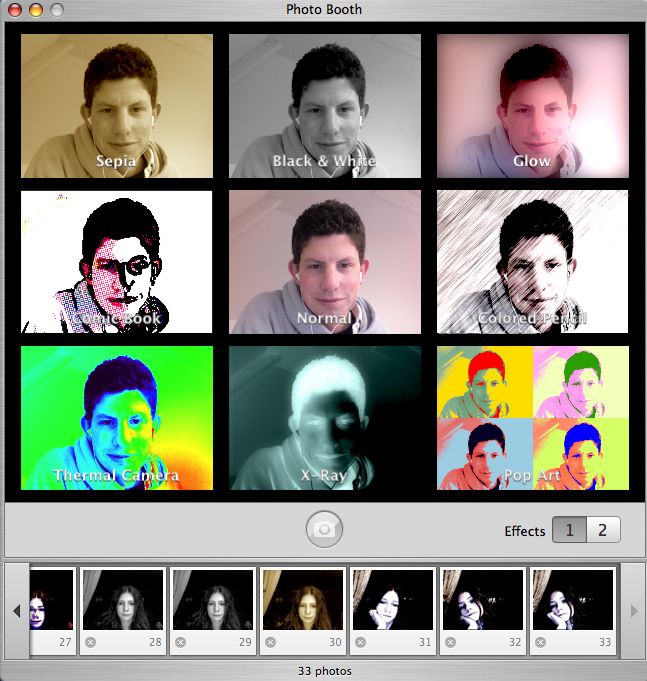
Photo Booth is a popular program available on all Apple computers. This software allows users to capture images and video clips. One feature that sets Photo Booth apart from other similar types of software is the special effects that can either distort the dimensions of the photo or add different backgrounds. Apple offers a free upgrade for Photo Booth that includes 56 new effects. Even better, the upgrade also works on the iChat program.
With dslrBooth you get awesome photo booth software, great features, free updates for a year, and great support to get you started. Available for PC and Mac. Download FREE Trial PC Hardware Requirements Mac Requirements Supported Cameras.
Step 1
Go to the official Apple Photo Booth and iChat upgrade page (see Resources).
FreeBooth - The freeware for your DIY photo booth. Works with windows, iOS and Linux and supportes almost every camera.It is completely free and open-source. SnapItUp is a Photo Booth for 2011 with large selection of themes for adults and kids alike. Want more themes? Visit our website or you can always create and share your own with our built in editor.
Step 2
Click the 'Download' link in the top right corner of the page to start the download. Choose a folder to save the file to, if prompted to do so.
Step 3
Open the file once it finishes downloading. Depending on the computer settings, the file may open automatically.
Follow the on-screen prompts to complete the installation process.
Video of the Day
More Articles
Developed by Apple, Photo Booth runs on OS X and is a software application for MacOS and iOS built-in iPads and MacBooks. This app is used for taking photos and videos with an iSight camera.
Contents
- 1 Photo Booth
- 2 Photos App
Photo Booth
Photo Booth displays a preview showing the camera’s view in real time. Thumbnails of saved photos and videos are displayed along the bottom of the window. The results can be shown or played by double clicking on the thumbnails.
By default, Photo Booth‘s live preview and captured images are reversed horizontally. This simulates the user looking into a mirror, however there is an option to provide unreversed images.
If the user clicks the large red button underneath the preview area, this will take a picture after an optional countdown.
Post-processing
The user can apply special effects while taking a picture by clicking on the “Effects” button. In fact, Photo Booth has two sets of image effects. The first set contains photographic filters similar to those used in Adobe Photoshop. The user can download additional effects from various websites. Another set of image effects allows users to replace the background with a custom backdrop.
Backgrounds
The user can apply backdrops to provide an effect similar to a green screen. When a backdrop is selected, a new message tells the user to step away from the camera. Once the background is analyzed, the user steps back in front of the camera and is shown in front of the chosen backdrop.
Since Mac OS X v10.5 Leopard, the Photo Booth application can recognize a still background, then replace it with either a pre-set image (built-in or user-supplied) or movie clip.
However, chosen backgrounds are available only on Macs featuring an Intel processor.
There are multiple ways of uninstalling McAfee Endpoint Protection for Mac, and we will discuss each of them in the following sections. Preparation before you uninstall McAfee Endpoint Protection: If McAfee Endpoint Protection is currently running, you should quit this app first. 1 Introduction McAfee® Endpoint Protection for Mac offers scalable security solution that minimizes the risk of exposing your Mac to vulnerabilities. The software provides a securely configured environment that:. Protects your Mac from viruses, spyware, trojan horses, and other malware threats. Uninstall mcafee endpoint protection for mac windows 10.
Photo Booth For Mac Download
Photos App
Mac Photo Booth For Windows
Photos is essentially a photo management application, and as such, it offers a nice variety of tools for tweaking digital photos.
However, the Photos application barely scratches the surface of what is possible with dedicated image-editing packages, which allow users to do everything from reworking color and brightness levels, filtering something flat to make it look three-dimensional, or merging images together to create a realistic looking snap of a real-world impossibility. Adobe Photoshop is probably the most well-known professional image editor, but it has a price tag that reflects its quality. There are also free options, such as the open-source powerhouse known as GIMP.
Some Photo Editing Apps for iPhone
Snapseed: This is an all-purpose photo editor for image enhancements and corrections. Snapseed is one of the most popular photo editing apps for iPhone, and for good reason. It is easy to use, but at the same time it offers a powerful collection of tools. This app excels in all basic photo processing techniques, including exposure, color, sharpening, cropping, and straightening. It also offers advanced editing features, such as selective adjustments and a healing tool for removing unwanted objects. Snapseed is available for free from the App Store.
VSCO: This app comes with excellent filter presets and a great selection of image adjustment tools. VSCO also functions as a camera app and photo sharing platform. However, it is the rich collection of filters and user-friendly editing tools that really make it stand out. Unlike other apps where the filters can be garish and overpowering, VSCO’s (pronounced visco) presets are designed to emulate classic and modern analog films. Many of the filters feature a soft, slightly faded look that has quickly become very popular on Instagram. The strength of every filter can be adjusted to suit your taste.
Filterstorm Neue: This is a photo editing app for advanced image editing. This app offers much of the editing control of more powerful desktop applications like Lightroom and Photoshop, but in a mobile-friendly format. In addition to the typical photo editing tools for adjusting color, exposure, etc., Filterstorm Neue includes one of the best mobile implementations of a powerful Curves control for fine-tuning brightness and contrast. You can selectively apply adjustments through a number of tools, including a powerful masking brush, as well as radial and linear gradient filters.
Enlight: Enlight is an all-in-one iPhone photo editor with creative and artistic tools. This app has an extensive collection of basic and advanced editing tools, as well as a selection of more whimsical and artistic effects for getting really creative with your images. The mask tool allows you to apply effects to selected parts of your image, leaving the rest of the photo unaltered. With so many features, Enlight can take a bit of time to fully understand, but each tool is very intuitive in how it works. Additionally, Enlight has one of the best built-in help features available in any photo editor app. Whether you want to perform a simple edit, or create an artistic masterpiece, you can do it all within Enlight.
Mextures: Apply textures, grains, and light leaks for beautifully creative edits. This app is great for experimenting with applying textures and other creative effects to your iPhone photos. While there are many worthy apps for doing this, the one that is often mentioned first by mobile artists is Mextures. Not only does this app offer a wide range of textures, grains, and light leaks, but each of them is fully adjustable and you can combine as many as you want through an easy-to-use layering feature. It can take a bit of time to learn how to take full advantage of Mextures’ features, but you can get started in no time by using a wide range of preset “formulas.” The creative options available in Mextures really are endless, and it is one of the best photo editing apps for creating your own unique editing style.
(source: Best Photo Editing Apps. Learn more about apps by visiting this website).
Links
Photo Booth Software For Mac Free
- Switching to a new device? Trade in your old Mac for fast cash at iGotOffer.com We pay the best price online for secondhand iPhones, iMac, MacBooks and for any other electronic device for that matter. Free instant quote, free fully insured shipping, fast and secure payment: Sell Macbook Pro.
- Some helpful tips about how to use Photo Booth from a reputable and trusted source, Apple: support.apple.com/en-ca/guide/photo-booth/welcome