How To Get Analysis Toolpak For Excel Mac
Excel like many of Microsoft’s other Office applications are extremely powerful tools that have many ‘hidden’ features. I stumbled on the Analysis ToolPak when I took an quantitative analysis class for my Masters program. Once I enabled the add-in and learned how to use the tools it provided, I have not used any other statistical tool except perhaps Minitab, but then I use that for the more complex analysis. The problem with the Excel add-in is that it is not loaded by default, this quickly became a problem for the professor teaching the class because he had to walk everyone through the process of enabling the powerful add-in. I’m posting this quick how-to for those of you that don’t know how to enable it or even know where to locate it. If you have any questions or comments, feel free to post them below.
- How To Get Data Analysis Toolpak In Excel For Mac
- How To Get Analysis Toolpak For Excel Mac 2011
- Data Analysis Pack For Excel
- How To Add Data Analysis In Excel
- How To Get Analysis Toolpak For Excel Mac
Note: I used Excel 2007 for this guide.
1. While Excel is open, click the Office button (the Orb) and click on Excel Options.
Load the Analysis Toolpak. The Analysis Toolpak is an Excel add-in program that is available when you install Microsoft Office or Excel (See later for instructions for installing Analysis Toolpak on a Mac). To use the Toolpak in Excel, however, you need to first need to.
- The Analysis ToolPak. If it is there just click on its checkmark and then OK to open it. It will then open automatically each time you open Excel. If you do not see the Analysis ToolPak in the above list then you need to get your Microsoft Office or Microsoft Excel CDs and do a custom install.
- How to Load the Microsoft Excel Data Analysis ToolPak: Excel 2007-2010. The Data Analysis ToolPak is added from the Office menu. Step 1: Click the “Office” button at the top left (with the Microsoft logo) and then click “Excel Options.” Step 2: Next, click “Add-Ins,” then select “Excel Add-Ins” in the Manage box. Step 3: Click “Go,” then click the “Analysis ToolPak” check box.
2. When the Excel Options window opens, click on Add-Ins located on the left pane. At the bottom of the window select Excel Add-ins from the drop-down to the right of Manage:, click Go… to proceed.
3. The Add-Ins window will open, add a checkmark to the check box next to Analysis ToolPak, click OK.
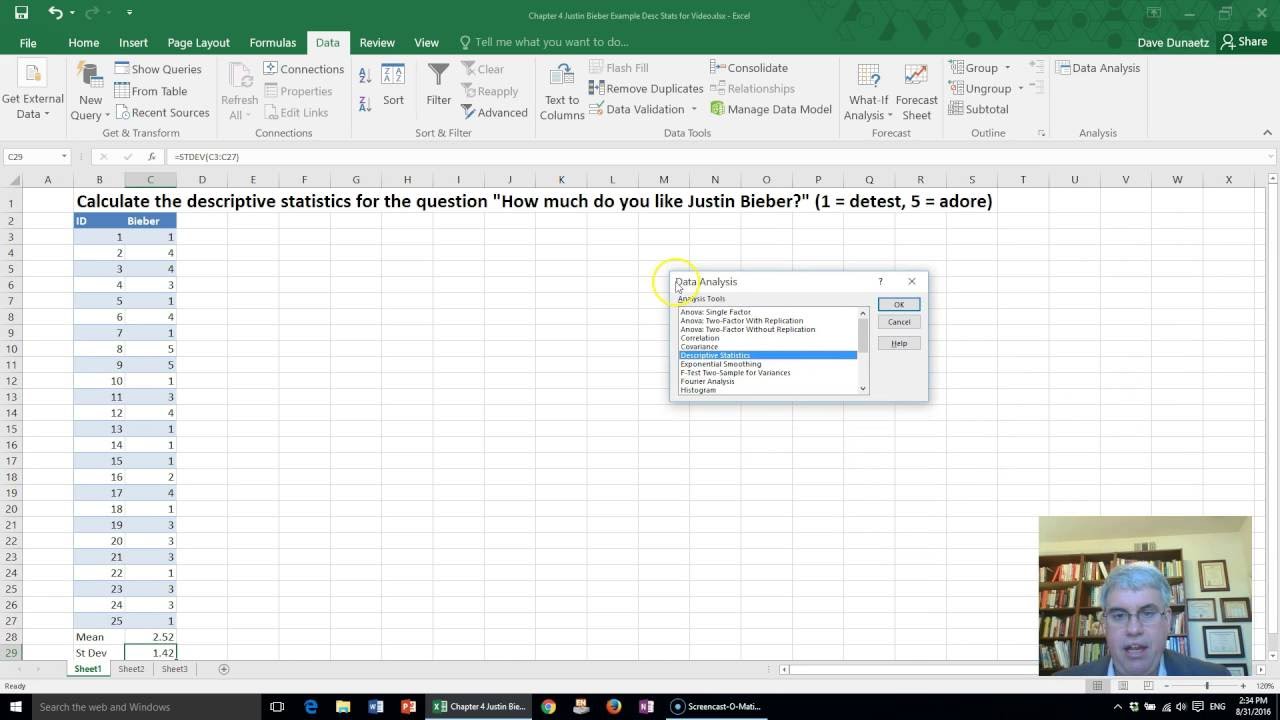
4. Once enabled the Data Analysis ToolPak will be located in the the Data tab all the way to the right. Click on Data Analysis to open the analysis tools available.
5. Available Data Analysis tools. Select the tool you wish to use and click OK.
If you do choose to upgrade to the standard or Ultimate version further down the line, they’ll set you back $30 and $80 a month respectively.AudacityFirst released in 2000, has gone on to become one of the most popular pieces of free software around — and for good reason. For example, you’ll still have access to: 500MB of bundled loops from leading producers, the Xpand!2 multitimbral music workstation with 20 effects and plugins, and the same support for third party-interface systems as the premium versions.One upside of not having quite so many features as the premium editions of Pro Tools is that Pro Tools First has less strenuous system requirements. It only needs an Intel Core 2 Duo processor, with 2GB of RAM and 15.5GB of install space. Recording apps for mac.
Download Excel 2010 Analysis Toolpak
Download Excel 2010 Analysis Toolpak office 2011 mac serial chief architect x7 crack nero 9 trail no
Q. Where is the data analysis button in Excel? – LibAnswers
If the Data Analysis command is not available in your version of Excel, you need to load the Analysis ToolPak add-in program. These instructions apply to Excel 2010, Excel 2013 and Excel 2016.
Using Excel’s Analysis ToolPak Add-In – Virginia Tech
This document illustrates the use of Excel’s Analysis ToolPak add-in for data analysis. The document is. function (available starting in Excel 2010).
Excel (Win) – Data Analysis Pack – University of Wisconsin.
Jan 13, 2002. Place checkmarks next to Analysis ToolPak and. microsoft excel 2003 2007 2010 2013 data analysis pack toolpak Suggest. DoIT Help Desk,.
Exploring the Analysis ToolPak – LinkedIn
How To Get Data Analysis Toolpak In Excel For Mac
Join Bob Flisser for an in-depth discussion in this video, Exploring the Analysis ToolPak, part of Excel 2010 Essential Training.
How to Install the Data Analysis ToolPak in Microsoft Excel.
Feb 08, 2013. Illustrates how to Add-In the Data Analysis ToolPak in Excel. Excel statistics data analysis toolpak. Check out our brand-new Excel Statistics Text: https://…
Download Analysis Toolpak Excel 2010
Download Analysis Toolpak Excel 2010 windows 10 operating systems 64 bit sale fl studio 12 crack key windows 10 product key free
Excel 2010 Download Data Analysis Toolpak
Excel 2010 Download Data Analysis Toolpak web page designers work buy download xbox 360 games online computer servers for beginners
Download Excel 2010 Data Analysis Toolpak
How To Get Analysis Toolpak For Excel Mac 2011
Download Excel 2010 Data Analysis Toolpak mac os x snow leopard 106 iso adobe photoshop cs2 for windows acrobat 9 pro updates unavailable
Excel 2010 Download Data Analysis Toolpak
Excel 2010 Download Data Analysis Toolpak infopath 2010 demo cs3 photoshop cost pathfinder manchester ct
Statistical Analysis : Microsoft Excel 2010 InformIT
Statistical Analysis: Microsoft Excel 2010 “Excel has become the standard platform for quantitative analysis. eBook Download Instructions
How to get Adobe Photoshop CC 2018 Portable EssaCC Tutorials