How To Format External Drive For Mac
- 2012-1-4 If you want to insure full Mac compatibility of a new external hard drive or flash disk, you’ll want to format the drive to the Mac OS Extended filesystem. This is particularly necessary for purchases of generic PC drives, which almost always come preformatted to be Windows compatible rather than.
- 2016-5-6 Many external hard drives come pre-formatted as FAT 32. This is a native Windows file format that can be read by Mac OS X, but is not ideal for use with Aperture. Before you begin to use your new external hard drive with Aperture, reformat it to the Mac OS Extended file system: Be sure your drive is attached and mounted.
- If you want to insure full Mac compatibility of a new external hard drive or flash disk, you’ll want to format the drive to the Mac OS Extended filesystem. This is particularly necessary for purchases of generic PC drives, which almost always come preformatted to be Windows compatible rather than.
- How To Format External Hard Drive For Mac
- How To Format External Drive For Mac And Windows
- How To Format External Drive For Macbook
To use Time Machine to make a backup of your Mac, you need any of these types of storage devices:
Many external hard drives come pre-formatted as FAT 32. This is a native Windows file format that can be read by Mac OS X, but is not ideal for use with Aperture. Before you begin to use your new external hard drive with Aperture, reformat it to the Mac OS Extended file system: Be sure your drive is attached and mounted. 2019-11-1 A hard drive can be used on any type of computer - PC or Mac. But in order for the computer and drive to talk to one another, the drive has to be formatted. This article explains. Seagate branded external drives come preformatted, some for PCs, some for.
- External drive connected to an AirPort Extreme Base Station (802.11ac) or AirPort Time Capsule
After setting up the storage device, you can use Time Machine to make a backup of your Mac. And after making your backup, you can use Time Machine to restore files from your backup.
External drive connected to your Mac
Time Machine can back up to an external drive connected to a USB, Thunderbolt, or FireWire port on your Mac.
External drive connected to an AirPort Extreme Base Station (802.11ac) or AirPort Time Capsule
Time Machine can back up to an external USB drive connected to an AirPort Extreme Base Station (802.11ac model) or AirPort Time Capsule.
How To Format External Hard Drive For Mac
- Make sure that the USB drive is formatted for Time Machine.
- Connect the drive to a USB port on your AirPort base station, then turn it on.
- Open AirPort Utility, then select your base station and click Edit to view its settings.
- Click the Disks tab in the settings window.
- Select your backup disk from the list of partitions, then select ”Enable file sharing”:
- If more than one user on your network will back up to this disk with Time Machine, you can use the Secure Shared Disks pop-up menu to make sure that they can view only their own backups, not yours. Choose ”With accounts” from the menu, then click the Add (+) button to add users.
- Click Update to restart your base station and apply the settings.
AirPort Time Capsule
Time Machine can back up to the built-in hard disk of an AirPort Time Capsule on your network.

Mac shared as a Time Machine backup destination
To use another Mac on your network as a Time Machine backup destination, complete these steps on the other Mac:
- Choose Apple menu > System Preferences, then click Sharing.
- From the list of services on the left, select File Sharing.
- From the list of Shared Folders on the right, Control-click the folder that you want to use for Time Machine backups.
- From the shortcut menu that opens, choose Advanced Options.
- From the Advanced Options dialog, select ”Share as a Time Machine backup destination.”
When setting up Time Machine on your other Mac computers, you should now be able to select the shared folder as a backup disk.
Mar 14, 2017 In the Microsoft Lync for Mac 2011 Update volume window, double-click the Lync for Mac 2011 Update application to start the update process, and then follow the instructions on the screen. If the installation finishes successfully, you can remove the update installer from your hard disk. Lync for mac. May 10, 2017 Microsoft Lync is the new rich client for Lync users on the Mac platform and offers integrated functionality for instant messaging, presence, conferencing and voice. Lync for Mac is designed to work with both Lync Server 2010 and Lync Online to help you: Control communication costs; Improve user productivity. How to uninstall Lync from your Mac. To uninstall Lync from your Mac. To remove the Lync icon from your Dock, sign out of Lync. Close the Lync sign in page. Press Control and click at the same time. Open Finder Applications. Scroll to Microsoft Lync. Drag and drop it into the Trash. Connect with your team anywhere using clients across Windows, Mac, iOS, and Android™, or bring remote participants into meeting spaces of all sizes with Skype for Business. How your phone number or email address is used. Microsoft will use your phone number or email address only for this one-time. Contains information about how to troubleshoot Lync for Mac issues in Skype for Business Online for Office 365. Discusses how to sign in to Skype for Business Online by using Lync for Mac and how to collect log files for Lync for Mac issues.
Network-attached storage (NAS) device that supports Time Machine over SMB
Many third-party NAS devices support Time Machine over SMB. For details, check the documentation for your NAS device.
How many mac addresses are available for virtual network adapters, created by hyper-v?. For virtual network adapters, Hyper-V assigns a value up to 256 to create individual MAC addresses. What happens if this is not sufficient? If more than 256 adapters are needed, an administrator can modify the MAC address pool to be larger. How many virtual network adapters can be created on a Hyper-V server? Up to 12 network adapters-8 synthetic and 4 emulated b. Up to 12 network adapters-4 synthetic and 8 emulated c. Up to 8 network adapters-4 synthetic and 4 emulated d. Up to 8 network adapters-4 synthetic and 4 emulated.
How to format a disk for Time Machine
How To Format External Drive For Mac And Windows
Time Machine supports all Mac OS Extended (Journaled) formats and Xsan formats. If the disk isn't using the correct format, Time Machine automatically prompts you to erase it when you connect it to your Mac:
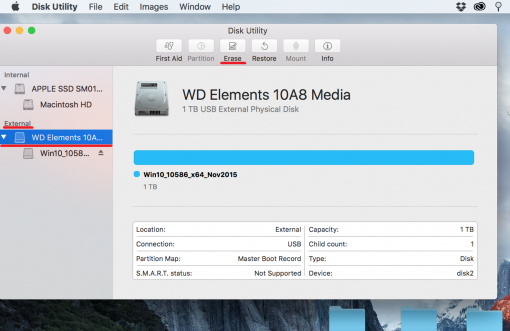
If you need to erase the disk manually, use the Disk Utility app to erase using the Mac OS Extended (Journaled) format.
How To Format External Drive For Macbook
Time Machine can't back up to an iOS device or disk formatted for Windows. And if your disk uses the Master Boot Record (MBR) partition scheme, some of its partitions might not be available for use with Time Machine.