Discord For Mac
The legacy of Discord-FuriousWings is a utility categorized within the part GT arcade, and you’ll download without spending a dime in your pc (home windows) and also on Mac (Apple) from the ou web site. Get transported to a fantastical world within the motion recreation Legacy of Discord FuriousWings by GT arcade.
Latest Version:
Requirements:
Mac OS X 10.10 or later
Author / Product:
Hammer & Chisel, Inc. / Discord for Mac
Old Versions:
Filename:
Discord.dmg
Download Discord for Mac OsX, you can Download Discord App for Mac Pc, IMac, Mac Mini, MacBook, and MacBook Pro devices. Here I am Giving the Direct download links for Discord for Mac users, these are also called offline Installers for Mac. The Discord app icon resembles a mouthless face on a purple speech bubble, which you'll find in the Start menu (Windows) or the Applications folder (Mac). This will open your Discord account if you're logged in. If you aren't logged into Discord, enter your email address and password and click Log In.
Features and Highlights
Never pay for voice chat again
Discord is always completely free to use with no gotchas. This means you can make as many servers as you want with no slot limitations. Wondering how we’ll make money? In the future there will be optional cosmetics like themes, sticker packs, and sound packs available for purchase. We’ll never charge for the app’s core functionality.
Play online with peace of mind
Encrypted server to client communication keeps your IP address safe. Stop getting ganked because you're logged into Skype. Resilient Erlang backend running on the cloud has built in DDoS protection with automatic server failover.
Always be connected to your friends
Download the free mobile app to chat while on the go or summon your AFK friends by sending a push notification with an @mention.
Text chat designed for the 21st century
Easily share images, videos, and links from your desktop or phone. The tool embeds most types of media directly in the chat. GIFs only play when you mouse over them, so your CPU is spared. Post those GIFs. Oh yeah!
Voice chat that doesn't slow down your game
Designed for use while gaming, the tool has minimal impact on your CPU. Your game's performance won't be affected in the slightest. Seriously. It's time to ditch CPU hogs like Skype.
The easiest setup you've ever seen
It takes just 10 seconds and doesn’t require any drivers or weird setting configuration. The tool can even run in the browser which is great for PUGs you invite to your voice channel or those stubborn friends of yours. You can download the Windows or OSX app for maximum performance.
Managing your server is easy, but powerful
Robust permissions and multiple channels, all within an easy-to-use UI, make the app perfect for both small groups or large guilds. Finally, the power you’ve come to expect from TeamSpeak, Vent, and Mumble in a package that isn’t ridiculously complicated.
Voice quality so clear you can hear a pin drop
The program is built with the latest tech using a modern jitter buffer, automatic gain control, noise suppression, echo cancellation, system attenuation on Mac and more. You'll love it and it works everywhere: desktop apps, browser apps, and phones.
Securely add and message friends
The tool allows you to add friends and individually message them outside of servers. Use block feature to prevent direct messages from baddies. It even hide the offenders' text in servers - keep your eyes pure!
See who's talking without pressing alt+tab
The app's customizable overlay allows you to see who’s talking in the middle of the action. You can also adjust individual volume settings, change servers and channels, or even kick people all without leaving your game. The overlay requires the Discord Mac Client and works on most games that use DirectX 9, DirectX 11, and OpenGL.
Note: Requires Discord account.
Also Available: Download Discord for Windows
Discord is a free voice and text chat utility application specifically designed for gamers. You can download discord for desktop PC and mobile devices. It is available for Mac and Windows operating system as well as Android and iOS. Discord free download app is popular among online gamers and communities.
If you want to install the Voice over Internet Protocol application then discord is the best option. Discord download is available for both PC and smartphones at no cost. it is a fast and secure Communication tool for free voice and text chats.
How to Uninstall Discord on PC or Mac. This wikiHow teaches you how to delete the Discord voice and text chat application, and remove it from your computer. Make sure Discord is not running in the background. If the Discord app is running. Before going to download the Discord App for Windows, Mac and Linux systems you should know about What is Discord App and What is discord bot. Here I providing the Free Direct download links of Discord App for All Operating systems like Windows,Read More ». I'm on mac also and would love Discord Nitro but don't see the point if I don't get any games. Lots of the games on Nitor are available on Mac, so there is no issue there - so why no support Mac users??

New Discord 0.0.9 Overview
Discord 0.0.9 is the latest stable release and available in 27 different languages. It is written in javascript and using WebRTC. The latest version of discord download allows you to text chat, receive notifications, send and accept game invitations, full call support, screen share feature and much more.
In Discord, you can join a community or create a new community to start chatting. It is a modern voice chat platform with a good interface. The interface of discord app is simple, attractive and functional. It is the best alternative for TeamSpeak and Skype.
Discord free download is available for web browsers, Android and iOS, Mac, Microsoft Windows and Linux distribution. According to discord incorporation, discord download has more than 130 million active users who are using discord on different devices like PCs, Laptops and smartphone.
24 keyboard shortcuts Mac users need to know This collection of keyboard shortcuts for macOS can help users get the most from their iMacs, MacBook Pro and MacBook laptops. Oct 18, 2019 Mac keyboard shortcuts. By pressing certain key combinations, you can do things that normally need a mouse, trackpad, or other input device. To use a keyboard shortcut, press and hold one or more modifier keys and then press the last key of the shortcut. For example, to use Command-C (copy), press and hold the Command key, then the C key, then. Keyboard shortcuts for mac.
Let us discuss the new features and functionalities introduced in the latest version of discord free download
Discord Download New Features and Functionalities
- The latest version of discord download for Windows is 0.0.9, Discord for Mac is 0.0.5 and for Android is 8.8.8 with lots of features and functionalities.
- One of the major advantage of Discord is it is available for all platforms and you can use and download discord for free.
- Discord is a modern VoIP tool with free voice and text chat. You can call or text chat in a group, join chat communities and create new discord groups, channels and communities.
- New release of Discord download for Mac is much better, faster with more security. Users can securely send and share videos, screens and images to others in real time.
- Get all the latest message and chat notifications to stay connected with discord community.
- Discord fully support Xbox so gamers can call and text chat to others in real time.
The latest version of Discord added a new authentication and instant invite features, beautiful volume slider to adjust volume, good quality audio and other incredible functionalities. - You can also add keybinds which is a useful feature for streamers.
- With Discord, you can invite other gamers and users to your chat group by sending them a link.
- The new version of Discord download for games is redesigned with a more organized chat structure and easy to manage different chat groups.
To learn more about features and functionalities of discord free download please visit Discord app official website.
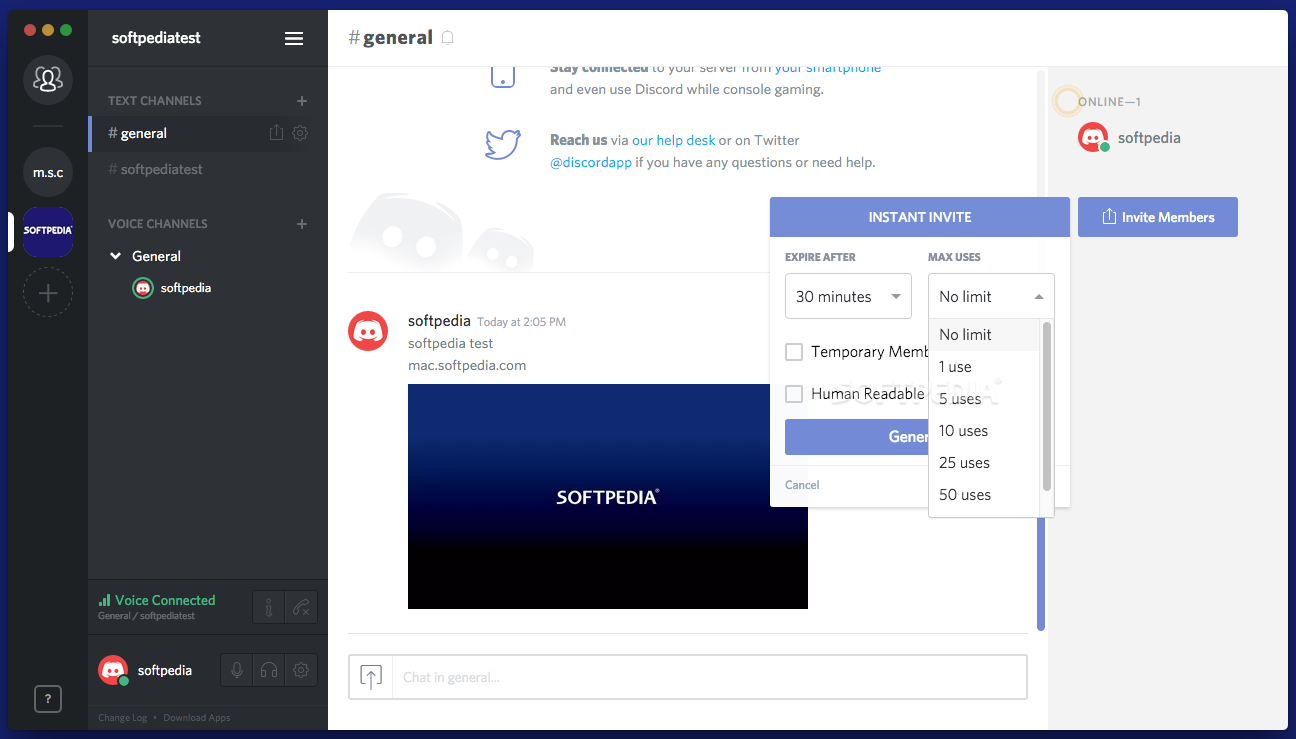
How to use Discord for Free?
To get started, download discord latest version for your device and install it on your system. Thunderbird for mac os x 10.6.8. To use discord is pretty simple.
The first step to start using discord is to register with discord and create a user name. After your successful registration, a new discord user interface appears on your screen. To create a new server, press the “plus” button on the lower left side of your device screen.
Now discord allows you to create or join a server for free. To create a new discord server, follow simple steps to complete the process. Once you create a server you can invite other people, create text and voice channels for friends and others. To keep channel private you can set a password in discord server permission section.
Download Discord for Windows and Mac at No Cost
Discord For Macs
We recommend you to download discord as it is free and best VoIP for gamers. You can get free discord setup for Windows and Mac by clicking on the download button given below. Discord download for windows comes in the installation package with a .exe file while discord for mac download available as a .dmg file. The download link is secure, safe and free to download discord for your device.