Avery 5160 Template For Mac
- Avery 5160 Label Template For Mac Pages
- Free Printable Avery 5160 Template
- Avery 5160 Template For Mac
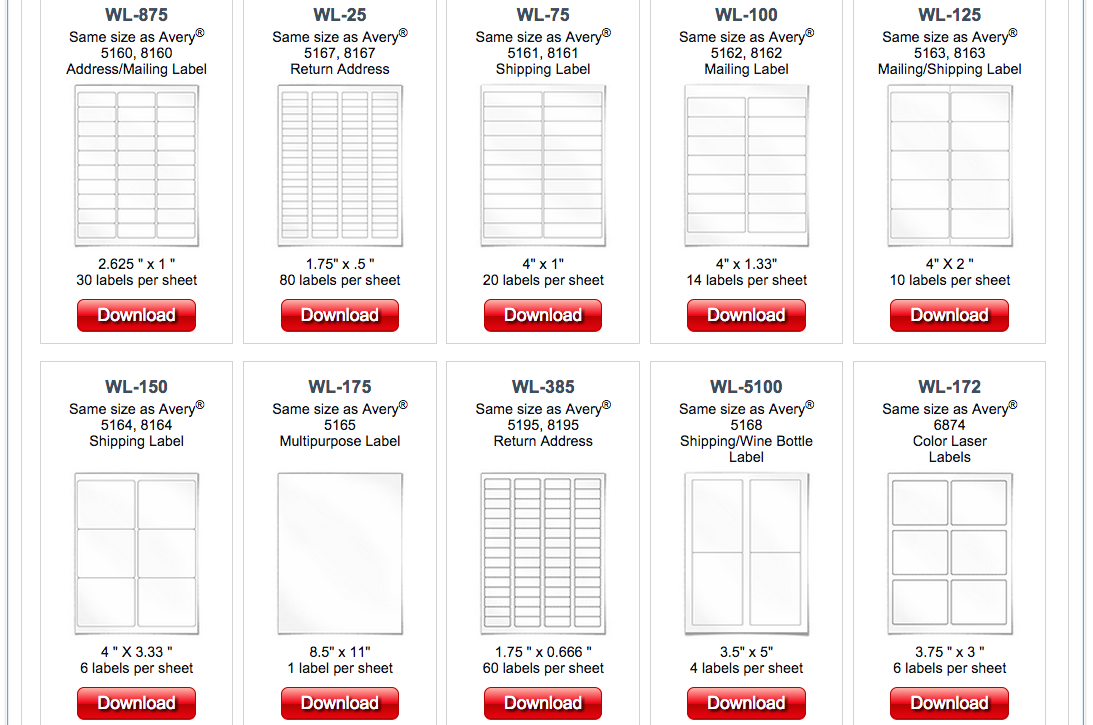
This is an Avery Shipping Labels Template for your Mac using Apple Pages, with each label being 1″ x 2-5/8″ and 30 labels per sheet. Fits various Avery sizes.
Make sure that you have downloaded and installed Avery Wizard for Microsoft Word.
- Free Avery Templates For Word 5160 Template 365 Mac 2011 2016 Download example from avery template for mac free template with resolution: 438 x 223 pixel.
- Find a Template. Avery Design & Print. Software Partners. Premium Quality Get the quality you expect from Avery, the world’s largest supplier of labels. 100% Satisfaction Guaranteed No hassles, no hurdles. Because when you’re 100% happy, so are we.
Start Microsoft Word. Click the Avery tab at the top of the Microsoft Word Ribbon toolbar and click the Avery Wizard logo
If you do not see an Avery tab at the top of the Microsoft Word Ribbon toolbar, click the Office button at the top left and then click the Word Options button. The Word Options screen will appear. Windows for mac freeware. Click Add-Ins and then select Word Add-Ins from the Manage drop-down list. Click Go. The Templates and Add-ins dialog box will appear. Check AVWiz12s.dotm and click OK. Close Microsoft Word, then re-open Word. The Avery tab should be added to the Ribbon toolbar. Click the Avery tab and then click the Avery Wizard logo to launch the Avery Wizard.
The Avery Wizard will open, click the Next button.
If you know your Avery product number, type in the product number in the Product number or description field. Click Search. Searching by product number is the fastest way to locate your product. The product number is usually shown as a four or five digit number in large print on the front of the package.
Or select a Product Category from the drop-down list. You can view products, in the product list, in order by Product No. or by Description. Click the Product No. column to sort the list numerically by product number or the Description column to sort the product names alphabetically. You can then scroll down the list to locate and select the product.
Select the product template and click Next.
Select a pre-design for your product template and click Next to start personalizing your template.
Avery template 8160 for microsoft word for mac free download
avery template 8160 for microsoft word, Windows Media Player 9.0, Bigasoft MP4 Converter for Mac 3.3.26.4162, Bigasoft WMV Converter for Mac 2.3.4.3959
Avery 5160 Label Template For Mac Pages
Free Avery Label Software Downloads – Mac
Avery Label Software mac software free downloads and reviews at WinSite. Free Mac Avery Label Software Shareware and Freeware.
Avery Labels Mac Software – Free Download Avery Labels Mac
Avery Labels Mac, free avery labels mac software downloads
Avery Wizard For Mac Software – Free Download Avery. – WinSite
Avery Wizard For Mac, free avery wizard for mac software downloads
Avery template downloads Official Apple Support Communities
I have recently switched from a PC to a Mac. I am unable to download Avery label templates. Any help would be appreciated.
Label Printer Pro 7 on the Mac App Store – iTunes

Download Label Printer Pro 7 for macOS @@minimumOSVersion@@ or later and enjoy it on your Mac. Download Label Printer Pro 7 for. • Up to date Avery.
Free Software for Easy Printing of Avery ® Products Business.
Avery Products Corporation announces its latest addition to the. system requirements and a free download, visit avery.com. Mac is a registered trademark.
avery Software – Free Download avery – Top 4 Download
avery Software – Free Download avery – Top 4 Download – Top4Download.com offers free software downloads for Windows, Mac, iOS and Android computers and mobile devices.
Pages Label Templates by Worldlabel
We offer a complete collection of label templates for your Mac Pages. similar in size to Avery. com. Anyone is free to download the label templates.
Download Avery Mac Software – Free Avery Downloads
Avery mac software free downloads and reviews at WinSite. Free Mac Avery Shareware and Freeware.
NO OPTION FOR AVERY STANDARD MAILING LABELS IN WORD FOR MAC.
I wanted to print a mailing label using Avery Product #5162. NO OPTION FOR AVERY STANDARD MAILING LABELS IN WORD FOR MAC 2016. Download Center; Sales & support;
Free Printable Avery 5160 Template
Label Templates for Pages for a Mac Released Worldlabel Blog
Worldlabel.com has released a large collection of label templates for download for the word processor Pages which works on Apple Mac computers. Downloads are free.
how do i create avery labels 5160 on mac – Apple Community
Apr 08, 2013. Question: Q: how do i create avery labels 5160 on mac . download the word template for the 5160 labels from avery’s website and open it in pages. peter.
Free Online Templates Labels, Business Cards, Greeting.
Avery Design & Print Online. With Avery Design and Print Online,. Works with PC or MAC systems Download For PC . Download For MAC .
Avery 5160 Template For Mac
How to get Adobe Photoshop CC 2018 Portable EssaCC Tutorials
Avery ® Address Labels – 5160 – Blank Word Template – 30.
Avery® Easy Peel® Address Labels 5160. Customize your own design and professional look for your upcoming mailing projects. Download our blank Microsoft Word template with 30 per sheet.
Download Free Label Templates For LibreOffice / Openoffice
For making labels with Writer Word Processor on Windows, Mac OS or Linux:
Free Avery Label Downloads – Mac
Avery Label mac software free downloads and reviews at WinSite. Free Mac Avery Label Shareware and Freeware.
Free Avery Label Software Downloads
Avery Label Software software free downloads and. Reeware Avery Label Software; Free Avery Mac Label Maker. Avery Label Pro Download Avery Label Software.
Avery 8660 template for mac free download
Avery 8660 template for mac Avery 8660 template for mac All postings and use of the content on this site are subject to the. Then go avery 8660 template for mac the Avery steps until I got to the end.
Avery releases free label software – (Jul 21) MacNN
Avery has released Avery Mac Label Expert, its free label creation software designed to handle the tedious task of creating and formatting text for printing to sticky labels.
Avery Template 5160 FOR MAC Avery Template 5160 FOR MAC.